Field Report
Apex Logger: The WordPress Malware That Keeps Coming Back (Case Study)
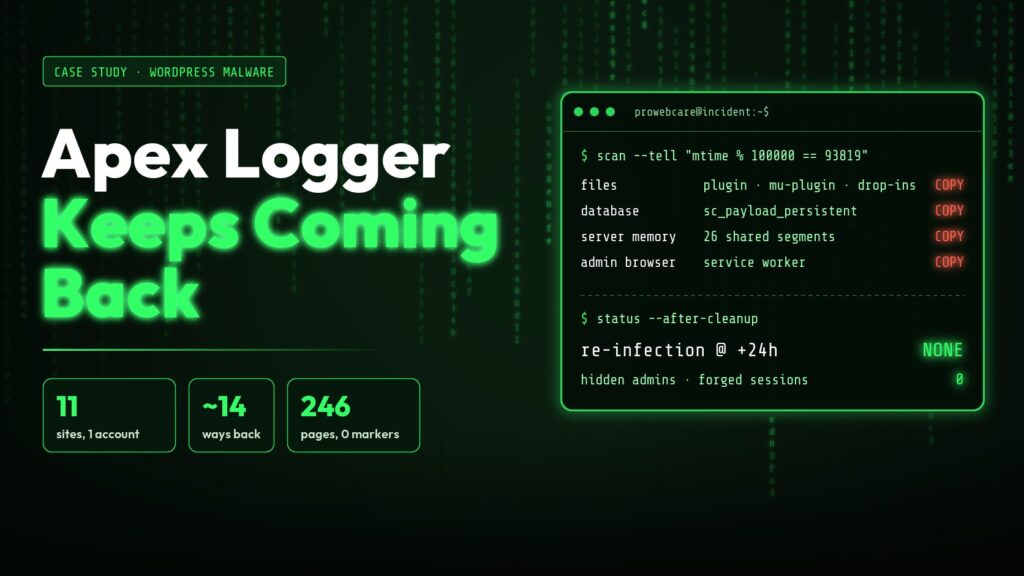
This is the story of one clean-up: eleven WordPress sites on one shared-hosting account, and malware that rebuilt itself every time someone removed it. It is written for site owners who want to know whether they are affected, and what it really takes to get rid of it. Everything comes from our own evidence. Anything we inferred rather than proved is marked “we believe”.
Not a one-off. Monarx documented the same malware family in August 2026 in “The WordPress infection that rebuilds itself faster than you can delete it”, under a different plugin name (“Rapid Worker Evo”). The markers match: the 93819 timestamp, the SC_DB_BEGIN loader blocks and the Ethereum selector 0x3bc5de30. They described it. We cleaned it out of a live account, and we found how the attackers got back in and one hiding place that their write-up does not mention.
TL;DR
- What it is. “Apex Logger” (earlier names
sharp-engine-dexandonyx-broker-vox, plus a third,datum-recorder-hq) is a self-healing WordPress loader. It keeps copies of itself in the database, in files and in server memory. It steals administrator passwords as they are typed, creates hidden administrators, plants a service worker in administrators’ browsers, and serves visitors a script that runs whatever its operators send. - How you know. Some files’ Unix modification times end in
93819. Options namedsc_…or made of 10–12 hex characters. Administrators likeadmin_3f9c…with the e-mail<login>@<your domain>. An active plugin you cannot see in wp-admin. - Why “clean the files” fails. The database and shared memory each hold a full copy. Any surviving copy rebuilds the rest, and one infected site re-infects every other site under the same hosting user.
- What works. Every copy, on every site under the hosting user, has to come out together and in the right order: files, database, server memory and the administrators’ browsers. Miss one and the rest come back. Below: what to look for, and the order we removed it in.
- Your browser. Remove the service worker and site data from every browser you logged in with before typing a new password.
- What not to do. Don’t rebuild one site while a sibling is still dirty, don’t keep the old database in a “fresh” build, and don’t restore a backup from the infected period.
The account
The client was a UK trades business. Its marketing agency had built eleven WordPress sites on one shared-hosting account: four live business domains and seven staging or temporary copies, all running under a single Unix user. Most shared one premium theme and page builder, with two security plugins and the host’s own auto-update plugin installed.
The sites had been migrated in August 2026 from a previous hosting account. That turned out to matter more than anything else.
What we were told vs what we found
What we were told. The sites “kept getting hacked”. Unknown administrators kept appearing. A hand clean-up in September had removed the malware files and the fake administrators, but both came back. The day before we were called, one live site had been rebuilt with fresh WordPress files and was infected again within hours. The security plugins’ logs, read later, showed a successful login from the United States with the owner’s own password.
What we found on the first look, before changing anything:
- One program on all eleven sites, installed as a plugin on ten and as a must-use plugin on one. It was a 411 KB obfuscated PHP file, padded with random bytes to about 2 MB so that every copy had a different hash.
- Every database held a full copy of the code in an option called
sc_payload_persistent(about 600 KB) and eight to ten hex-named blobs. Across the eleven databases there were 438 hex-named options from several generations of the malware. - A hidden administrator on each site, invisible in wp-admin.
- Unrelated breakage: one site answered 500 on every page, another 404 on every inner page, and a live domain pointed at the wrong server.
- Two of the host’s one-click login files still in web roots, each giving administrator access to anyone with the link.
The “fresh build” had kept its old database. That isn’t a rebuild.
How the malware works
We analysed the code as text only: nothing was executed and no attacker server was contacted. Internally it calls itself SCV (the first code line is /* SCV:5.0.1 */) and prefixes almost everything with sc_.
About fourteen ways back. On each site it kept:
- the plugin (
plugins/apex-logger/, forced intoactive_plugins) and a must-use copy (mu-plugins/apex-logger.php); - a hidden data folder
wp-content/.sc_<8 hex>/with another full copy, an installer, guard files and its own backups of files it had edited; - the database copy, plus a gzipped copy in an option named after
md5(ABSPATH.'opt'), and encrypted options named aftermd5(ABSPATH.'93819'…). The encrypted options hold the hidden admin’s credentials, the server key, the service-worker payloads and a list of the cookies it had minted; - a copy in server shared memory (outside every file and every database table);
- loader blocks in
advanced-cache.php(SC_ADV_BEGIN),db.php(SC_DB_BEGIN),object-cache.php(SCOCV:, with a data file.wp-object-cache-<8 hex>.dat) and the theme’sfunctions.php(SC_TH_BEGIN, with a watchdog that refills an emptied file); - guard files
.g_<8 hex>.php, run on every request and every ten minutes; - zip copies
<8 hex>.zipinwp-content/,uploads/and the theme folder; - an installer endpoint at
/?p=<8–9 digits>that answers 404 to anyone without the key; - edits to
wp-config.php, with the original modification time put back.
Healing. Any one surviving copy restores the rest. Restores trigger on a missing or shrunken file, on an hourly cron, on plugins_loaded, and whenever a file’s stat signature changes. If you make the must-use copy read-only, it renames the whole mu-plugins folder and swaps in a fresh one. Before it edits a drop-in, the theme or wp-config.php, it backs the file up, requests the home page with a canary token, and rolls back if it gets a 500.
The forged timestamp. Every file it writes is back-dated to the age of a random core file, then adjusted so that the Unix modification time ends in 93819. The malware uses the same rule to recognise its own copies. For defenders it is the best tell there is.
Stealing logins. An authenticate filter at priority 999 records every administrator’s plaintext password. A second routine mints session tokens and 14-day auth cookies for up to three real administrators. Both go to the attackers’ server, along with the plugin list and login URL.
Hidden administrators. One per site, named admin_, adm_, administrator_ or backup_ plus 10 hex characters, with the e-mail <login>@<site domain>. If a matching account already exists, it adopts it and resets the password. It re-creates the account on init, every six hours on admin_init, hourly by cron and on every contact with its server. It hides the account from the Users screen, from REST queries and from the administrator counts.
Hiding everything else. It removes itself from the plugin, must-use and drop-in lists, from update checks and Site Health, and from three popular file-manager plugins. It also suppresses new-user and login e-mails. Its server can push rules to delete any plugin whose files match a pattern. In our case those rules were empty.
The admin-browser service worker. On wp-admin and wp-login over HTTPS it registers a service worker with scope /: a script that stays in the browser after you leave the site. It copies the log and pwd fields from every login form to the attackers. It can upload a plugin zip through the administrator’s own session (update.php?action=upload-plugin), and it can run attacker JavaScript inside wp-admin. A perfectly cleaned server can be re-infected from a browser.
The visitor script. On public pages it prints <script data-sc="<6 hex>-<6 hex>"> and a comment <!-- sc<6 hex>-<6 hex> -->. The script skips bots, headless browsers, Lighthouse and AI crawlers. For each real visitor it assigns an ID, sends a browser fingerprint to the attackers and executes whatever JavaScript comes back. A click hook fetches a further stage when a real person clicks an element drawn by an earlier stage. We believe this is the ClearFake / ClickFix lineage: fake “update your browser” or “verify you are human” pages that talk visitors into pasting a command. The final page is chosen per visitor, so we could not replay it.
EtherHiding: a command channel nobody can take down. The code contains no server address. It sends an eth_call (selector 0x3bc5de30) to one of three Ethereum contracts through about twenty public RPC endpoints, such as https://0xrpc.io/eth, and decodes the reply into a key and a list of server URLs. No one can seize a contract, and the operators can move servers with a blockchain write. When we looked, the servers were correspondabb.com, rehearsal-b.com and chordapple.com; an older copy used basic-junior.com.
Spreading. It walks up to three directory levels above the WordPress root, plus the usual hosting paths. Any folder with wp-admin that has no 93819-stamped file gets a must-use copy. That copy needs no database access: on that site’s next request it creates a hidden administrator in the site’s own database. Any PHP request wakes it: a visitor, a crawler, the host’s auto-updater, or its own loopback and cron calls.
Timeline
All times UTC. The early entries come from the imported databases, which carried their history with them.
| When | What happened |
|---|---|
| Stamp: late Oct 2025 | One imported database’s persistence manifest (sc_persist_manifest) still listed the previous account’s paths, including a must-use loader onyx-broker-vox.php stamped late October 2025. The malware forges timestamps, so treat this as a hint of age, not a date. |
| 26 Jun and 31 Jul 2026 | Earliest sc_last_rescan values in two imported databases. |
| 10 Aug | On the previous host, 15 plugin zips named onyx-broker-vox*.zip were uploaded under the agency’s administrator on one site. We believe the service worker did this through a logged-in browser. |
| 11 Aug, 07:13 | New account created. Sites migrated in over the next two weeks. |
| 11 Aug, 13:50 | First malware marker, 6.5 hours later: a PHP log line invalid_schedule for the cron hook sc_cron_fetch. The cron row came in with the database before the code was loaded. |
| 12–27 Aug | The same marker on six more sites, each a few hours after its import. |
| 13 Aug | A hidden administrator logs in on one site. |
| 4 Sep | Hidden-admin sessions at 10:00–10:25. Live code (4.3.24, sharp-engine-dex) at 10:25:25, and on six sites by 15:16. |
| 5 Sep | A hand clean-up removes loader files, the hidden-admin users and zip files, and runs core checksums. The database copy stays. At 19:02 the same evening, the malware re-creates hidden administrators on five sites through loopback requests. |
| 7 Sep – 13 Oct | A bot tries the malware’s own hidden-admin usernames from rotating residential proxies, always with the same stale Chrome 145 / macOS user agent. |
| 14 Oct, 12:55:04 | Successful login to one live site with the owner’s real password, from a US home-broadband address, with that same user agent. |
| 14 Oct, 12:55:29 | Under that session a hidden administrator is created and tokens are forged for two real administrators. A shared-memory copy appears in the same second. |
| 14 Oct, 12:57–13:46 | A hidden administrator appears on every other site, each on that site’s next PHP request (a visitor, a search crawler, the host’s auto-updater). The malware upgrades itself in place to apex-logger 5.0.1. |
| 15 Oct, 16:20–16:33 | One live site is rebuilt with fresh core and theme. Its database is kept. |
| 15 Oct, 17:49 | That site is re-infected 76 minutes later, by a request from the server itself. Another rebuilt copy runs the malware 5 seconds after its wp-config.php is written. |
| 16 Oct, 21:24–22:35 | Our clean-up of all eleven sites. |
| 17 Oct, 08:01 | +24 h re-check: no re-infection. The shared-memory copy is found and cleared at 08:11. |
| 17 Oct, 09:03 | One renamed administrator per site; everyone else demoted to Editor; all passwords replaced again. |
Finding the door
There were two answers: one we could prove, one we could not.
The October wave was a login, not an exploit. The security plugins’ logs show a successful login with the owner’s account at 12:55:04 and a hidden administrator created 25 seconds later under that session. Three things tie it to the attackers:
- the address was a US residential connection, and the owner only ever logs in from the UK;
- the browser signature was identical to the bot’s, which had spent five weeks guessing the malware’s own usernames;
- the owner had typed that password fifteen times on infected sites in September and October, straight into the
authenticatefilter.
We rate this probable rather than proven, because raw access logs were not available over SSH.
The other ten sites needed no login. Each hidden administrator there was created during an ordinary request, with tokens forged for every administrator in the same second. No password check happened at those times. That is the malware spreading inside the account.
It was not a plugin flaw. We checked every installed plugin, version by version, on the dates of both waves:
- A file-manager plugin had a real unauthenticated backup-disclosure flaw in August and September, but no backup ever existed to leak.
- The page builder’s admin-creating CSRF only applied to versions installed between 23 and 29 September.
- A backup plugin’s remote-access bypass needs keys, and the key option was empty on every site.
- The premium add-ons named in critical advisories were not installed.
It was not the theme. All 5,712 files of the premium theme bundle matched the vendor copy, with no malware markers. One bundled add-on had its licence check removed. That is a licensing problem, not a door.
Still unknown: how the malware first got in, before August, on the previous host. The imported databases prove it was already there, but we had no logs from the old account. One clue about how hidden-admin access travelled: on 3 September a corporate e-mail link-scanner obtained a hidden-admin session. We believe an auto-login link for that account was sitting in someone’s inbox.
What the attackers were doing with the sites
Collecting administrator access. Passwords went to the attackers as they were typed. The malware also issued itself 14-day login cookies for every real administrator (owner, agency and client users), valid until 28 October. Changing the salts cancelled them.
A launch pad against visitors. The visitor script sat in every database. Its “last printed” timestamps show it running on nine sites on 14–16 October, and we saw it live in one cached home page. Because it hides from crawlers, Google only ever saw clean pages: Safe Browsing listed every domain as clean, including the four attacker domains. Those domains appear in scans of thousands of other websites. This was a mass campaign, not a targeted attack.
Readable during the infection. We confirmed these were present but did not open them:
- SMTP mailbox passwords for three mailboxes;
- 360 + 643 + 11 entries across three form plugins;
- Google-review connection data on ten sites.
The code we analysed had no bulk-copy routine, but its server could push new code, so copying cannot be ruled out.
Not found: spam pages, injected links, redirects, content or settings changes, spam sent through PHP mail, card data (there was no shop), or any plugin-deletion rules. The service worker’s admin payload was a placeholder console.log("page_ok"), waiting for something worse.
How to check your own site
Allow ten minutes with phpMyAdmin and, if you have it, SSH. The queries use the default wp_ prefix; yours is $table_prefix in wp-config.php. Check every site on the account, not just the one that looks hacked.
1. The malware’s own options. Rows such as sc_payload_persistent, sc_persist_manifest or sc_c2_cache mean you have it.
SELECT option_name, LENGTH(option_value) FROM wp_options
 WHERE option_name LIKE 'sc\_%' OR option_name LIKE '\_transient\_sc\_%';
2. Hidden administrators. On an imported database the e-mail domain may be the source site’s.
SELECT ID, user_login, user_email, user_registered FROM wp_users
 WHERE user_login REGEXP '^(admin|adm|administrator|backup)_[a-f0-9]{6,10}$'
   AND user_email LIKE CONCAT(user_login, '@%');
Then compare the database’s administrator list with wp-admin → Users. The malware hides its own user, so any difference is a finding.
SELECT u.ID, u.user_login FROM wp_users u
  JOIN wp_usermeta m ON m.user_id = u.ID AND m.meta_key = 'wp_capabilities'
 WHERE m.meta_value LIKE '%administrator%';
3. active_plugins. Look for apex-logger, sharp-engine-dex, datum-recorder-hq, onyx-broker-vox, or any entry whose folder does not exist.
SELECT option_value FROM wp_options WHERE option_name = 'active_plugins';4. The file tell (SSH). Run it from the account root, not one site’s.
find /path/to/account -type f -printf '%T@ %p\n' \
  | awk '{split($1,t,"."); if (t[1]%100000==93819) print $2}'
grep -rlF -e '/* SCV:' -e sc_dbg_log -e SC_ADV_BEGIN -e SC_DB_BEGIN \
  -e SC_TH_BEGIN -e SCOCV: /path/to/account
A stamped file with clean content can happen; we found one. A marker hit cannot.
5. Files, drop-ins and memory.
- In
wp-content/:.sc_*folders,.g_*.php,.gk_*,sc_debug_*.txt,<8 hex>.zip,.wp-object-cache-*.dat. - Drop-ins:
object-cache.php,advanced-cache.phpordb.phpthat your caching plugin did not write. - Must-use plugins:
mu-plugins/apex-logger.php, or anything there you cannot attribute. - Memory: on shared hosting a full copy can live in server memory, outside every file and every table. Checking for it and removing it safely is not a phpMyAdmin job. Ask your host or a responder.
Why the usual cleanup fails
- It heals faster than you work. A guard runs every 600 seconds and a recovery cron every hour, and every request checks its files. Delete the plugin and the next page view restores it.
- It wakes itself. Its loopback calls trigger cron and the canary, so a site left open heals itself.
- The sibling sites. A dirty site writes a fresh copy into a clean one under the same user. Here, rebuilds were re-infected in 76 minutes and in 5 seconds.
- The database copy. The September clean-up left it, and the hidden administrators were back that evening.
- The memory copy. It survives a PHP restart and lasts until it is removed or the server reboots. We nearly missed it.
- Your browser. The service worker hands over the new password at the first login.
- The host’s scanner. It may quietly delete your quarantined evidence.
The clean-up: what it took
We cleaned all eleven sites in one evening session, 16 October, 21:24–22:35 UTC. Every server step was approved and logged. Nothing was destroyed: every removed item went to a quarantine outside the web roots with a checksum manifest, so any step could be reversed. This is the order we used:
- Snapshot, off the server. Every web root and every database, verified, copied off the box before anything changes (5.4 GB here). It is evidence and an emergency rollback, never a restore source. Copy it off straight away, because the host’s own scanner may delete anything it recognises, your quarantine included.
- Contain every site under the hosting user at once. Block the malware’s query endpoints (
?sc_c=,?sc_b=,?sc_verify=,?sc_cb=,?sc_pb=), its browser signature and any leftover one-click login files. Then put every site behind a maintenance wall at the same moment, so no PHP request (visitor, crawler, cron or the server itself) can wake a copy while you work. Prove the wall from outside the server. - Loaders first. Hidden
.sc_*folders, infected drop-ins (advanced-cache.php,object-cache.php,db.php) and their data files,.g_*.phpguards, zip copies, and any loader block in the theme’sfunctions.phpor inwp-config.php. Compare those two with known-good copies before you trust them. - Then the bodies. The plugin folder, the must-use copy and every marker and temp file: 188 items here. Re-run both tells (the
93819timestamp and the code markers) a few minutes later. They must stay at zero. - Then the database, after exporting each one. Delete the
sc_*options and transients (25–37 per site here), the hex-named options (31–49 per site), the malware’s cron hooks andactive_pluginsentries, every session token and application password, and orphan user meta. Strip the hidden administrators’ role first and delete them afterwards. About 800 rows in all, and every count must read zero afterwards. - Only now WP-CLI.
wp core verify-checksumsand plugin checksums on every site. Delete the hidden administrators with their content reassigned. - Rotate. Shuffle the salts everywhere, which cancels every stolen cookie. Replace every administrator password (17 here) without displaying it, and end every session again.
- Reopen every site together, hardened. Purge caches. Disable file editing, block PHP under
uploads/, denyxmlrpc.php, turn registration off, route security alerts to someone who reads them, and send aClear-Site-Dataheader on the login and admin pages for at least 14 days to evict the service worker. - Clean every browser that logged in, before anyone types a new password (steps below). Then watch files, users, sessions and logins for at least a week.
The copy we almost missed. At the +24-hour re-check every file and database tell was at zero. The hosting account still held 26 complete copies of the malware in server memory. Three had been created in the same second as the attacker’s login; the rest dated back to August and September. A file scan, a database clean-up and a PHP restart all leave this copy alone. We removed every one and confirmed none remained.
Need to remove this? Ask us. The steps above get you most of the way. The rest is where clean-ups fail: finding and removing the copy in server memory, a maintenance wall this kind of shared host actually honours, and the host-specific traps that silently break steps 2, 6 and 8. That is why this malware survived a hand clean-up and two rebuilds before we were called.
Seeing the same issues? We can help → We clean every site on the account, not just the one that looks hacked, and check again after 24 hours.
Verification and the re-check
We never call a site clean on a file scan alone.
- Tells at zero on every site: no code markers, malware file names or unattributed drop-ins. Malware options, hidden administrators and forged sessions all at 0. Core checksums passing.
- Rendered pages: every sitemap URL on the nine reachable sites fetched as a crawler and as a visitor. 0 markers in 246 pages, and 0 again when two sites were re-run the next day.
- A real browser, logged out: no service worker, no visitor script, no traffic to any attacker host.
- +24 hours: no re-infection, no new users or posts, no suspicious cron hooks.
- Still with the owner: the status stays “cleaned, monitoring” until each administrator has logged in from a cleaned browser, every form has had one real test enquiry, a second independent scanner has run, a test alert has arrived, and every password outside WordPress has been changed. That means the hosting panel, database users, SMTP mailboxes and anything that shared the stolen password.
Your browser is part of the infection
The service worker stays in the browser of anyone who logged into an infected site. It copies the username and password out of the login form, and it can act inside a logged-in dashboard. A Clear-Site-Data header helps, but the worker can answer requests from its own cache and may never see the header. Remove it by hand.
Who: everyone who logged into any affected site during the infection, on every device and browser profile.
Chrome, Edge or Brave on a computer
- Close every tab that has any of the affected sites open.
- Type
chrome://serviceworker-internals/in the address bar (Edge:edge://serviceworker-internals/, Brave:brave://serviceworker-internals/). Press Ctrl+F and search for each domain. For every entry found, click Unregister. - Type
chrome://settings/content/all. Search each domain and click the bin icon on every match. - Simpler alternative to step 3: Settings → Privacy and security → Delete browsing data → Advanced → time range All time → tick “Cookies and other site data” and “Cached images and files” → Delete. This logs you out of every website, which is fine.
- Repeat in every browser profile (the round avatar at the top right; each profile keeps its own data).
- Close the browser completely and open it again.
- Check: open
https://<your site>/wp-login.phpbut do not log in. Press F12, open the Application tab, click Service Workers. It must say “No service workers”. Checkchrome://serviceworker-internals/again: no entry for that domain. - Only now log in with the new password, and set up two-factor login straight away.
- If the browser had the old password saved, replace it. The old one is in the attackers’ hands.
Firefox: type about:serviceworkers and click Unregister on each entry for your domains. Then go to Settings → Privacy & Security → Cookies and Site Data → Manage Data, search each domain and click Remove Selected. Check about:serviceworkers again.
Safari on a Mac: Safari → Settings → Privacy → Manage Website Data → search each domain → Remove. This removes workers as well. To check, enable the Develop menu (Settings → Advanced) and look under Develop → Service Workers.
iPhone or iPad (Safari and Chrome share one engine): Settings → Safari → Advanced → Website Data → find each domain → swipe left → Delete, or “Remove All Website Data”.
Android Chrome: chrome://serviceworker-internals/ works on the phone. Otherwise go to Settings → Site settings → All sites → each domain → Clear & reset.
Does two-factor login fix this? Partly. With two-factor login a stolen password alone no longer gets anyone in, which closes the door used in October. It does not stop a worker still in your browser from using a session you have already opened. The order is fixed: clean the browser, then use the new password, then turn on two-factor login.
The ClickFix question. Did anyone see a “verify you are human” or “update Chrome” page on the sites and follow its instructions, such as pressing Win+R, pasting a command or downloading a file? If so, that computer needs a full antivirus scan before it is used with the new passwords. These steps clean the browser, not an infected computer.
Indicators you can search for
| Type | Indicator |
|---|---|
| Slugs | apex-logger (current, /* SCV:5.0.1 */), sharp-engine-dex (4.3.24), datum-recorder-hq, onyx-broker-vox (older must-use loader) |
| Body hash | Padding (\n/*<hex>*/) stripped: 411,541 bytes, SHA-256 d2339808db7a4f68574913389903fc25ad8e8807f42e983a320780d383782e39. Padded file hashes are useless. |
| Timestamp rule | Unix mtime mod 100000 = 93819 |
| Code markers | /* SCV:, sc_dbg_log, SC_ADV_BEGIN, SC_DB_BEGIN, SC_TH_BEGIN, SC_OC_BEGIN, SCOCV:, <!--SCK: |
| Files | mu-plugins/apex-logger.php, plugins/apex-logger/, .sc_<8 hex>/, .sc_tmp/, .g_<8 hex>.php, .gk_44870459, sc_debug_*.txt, <8 hex>.zip, .wp-object-cache-<8 hex>.dat/.lkg, *.php.off, /tmp/sc_*.lock |
| Drop-ins | object-cache.php, advanced-cache.php, db.php carrying the markers above |
| Options | sc_* (sc_payload_persistent, sc_persist_manifest, sc_c2_cache, sc_own_rec, sc_js_printed_ts), _transient_sc_*, names matching ^[a-f0-9]{10,12}$ |
| Cron | sc_cron_fetch (schedule sc_interval, 36,000 s), sc_cron_recovery, sc_cron_guard, or a random 20-character hook; invalid_schedule lines in the PHP error log |
| Hidden admins | ^(admin|adm|administrator|backup)_[a-f0-9]{6,10}$, e-mail <login>@<site domain> |
| Endpoints | /?p=<8–9 digits>, ?sc_c=, ?sc_b=, ?sc_verify=, ?sc_cb=, ?sc_pb= |
| Visitor script | <script data-sc="<6 hex>-<6 hex>"> + <!-- sc<6 hex>-<6 hex> --> |
| Attacker domains | correspondabb.com, rehearsal-b.com, chordapple.com (path /SGct2K), basic-junior.com |
| Ethereum | RPC https://0xrpc.io/eth (one of ~20); contracts 0x9a4752caa1c15868487a0acb691f81bfa901e063, 0x839d1ce5c3f259e8d3d17114d7186edabdbea94b, 0x6d2c5435ef70196740a48904b69377935d50abbb; selector 0x3bc5de30 |
| User agents | Malware bot and the October login: Mozilla/5.0 (Macintosh; Intel Mac OS X 10_15_7) AppleWebKit/537.36 (KHTML, like Gecko) Chrome/145.0.0.0 Safari/537.36. Credential stuffing against an agency login: Mozilla/5.0 (Windows NT 10.0; Win64; x64) AppleWebKit/537.36 (KHTML, like Gecko) Chrome/151.0.0.0 Safari/537.36 |
| Memory | Shared-memory segments of ~412–448 KB owned by the hosting account |
| Background noise | XML-RPC brute force from a German scanner hoster (AS200373), unrelated to the malware |
Why no IP addresses. The logins and probes came through residential proxies: home and mobile connections belonging to people who don’t know their line is being rented out. The addresses rotate by the minute (three tried the same username within seven seconds), and blocking or “tracing” them helps nobody. Pivot on the user agent instead: every malware-side action here used that one stale Chrome 145 / macOS string, so search your access logs for it. The stable identifiers of this operation are the three contract addresses. Those are what to look for in threat-intelligence feeds.
Lessons
For owners. Your password was stolen on your own site, so a strong password didn’t help; two-factor login would have stopped the October login. “We rebuilt it” means nothing if the database came along. And a “verify you are human” page that asks you to paste a command is always an attack.
For agencies. Eleven sites under one hosting user is one site with eleven front doors. Migrations carry infections, so check a database before you import it. Delete one-click login files, use real licences, and keep administrator accounts to a minimum: after this case each site had exactly one, renamed. Old configuration debris, like a firewall prepend pointing at another site or a missing .htaccess, hides real problems and costs hours in an incident.
For responders. Find the database copy and the memory copy before you call it done. Treat every site under one Unix user as one incident. Get evidence off the server straight away. Key on behaviour, not hashes: every copy here was padded to a different hash.
How to stay safe
- Never reuse passwords. Use a password manager and two-factor login everywhere.
- One site per hosting user where you can, and never restore a database from an infected period.
- Keep plugins and themes updated and properly licensed.
- After your host’s one-click WordPress login, check that no auto-login file is left in the web root.
- Send security-plugin alerts to an inbox someone reads.
- Monthly: check the administrator list (in the database as well as wp-admin), the plugin list and Google Search Console’s Security Issues page.
- If a site shows an “update Chrome” or “verify you are human” page, or asks you to run a command, don’t. Close it and tell whoever looks after the site, with the time and device.
Seeing these signs on your site?
If the checks above found something, don’t start deleting files. Half a clean-up is how this malware survived its first removal: every copy you leave rebuilds the rest, usually within the hour.
Need to remove this? Ask us. If you have the same issues, we can help. ProWebCare cleans and hardens hacked WordPress and Joomla sites, including multi-site hosting accounts with self-healing malware like this one. Every copy goes: files, database, server memory and admin browsers. Then we check again after 24 hours.
Seeing the same issues? We can help → Tell us the time and what you saw. Or read about our malware removal and WordPress clean-up services.