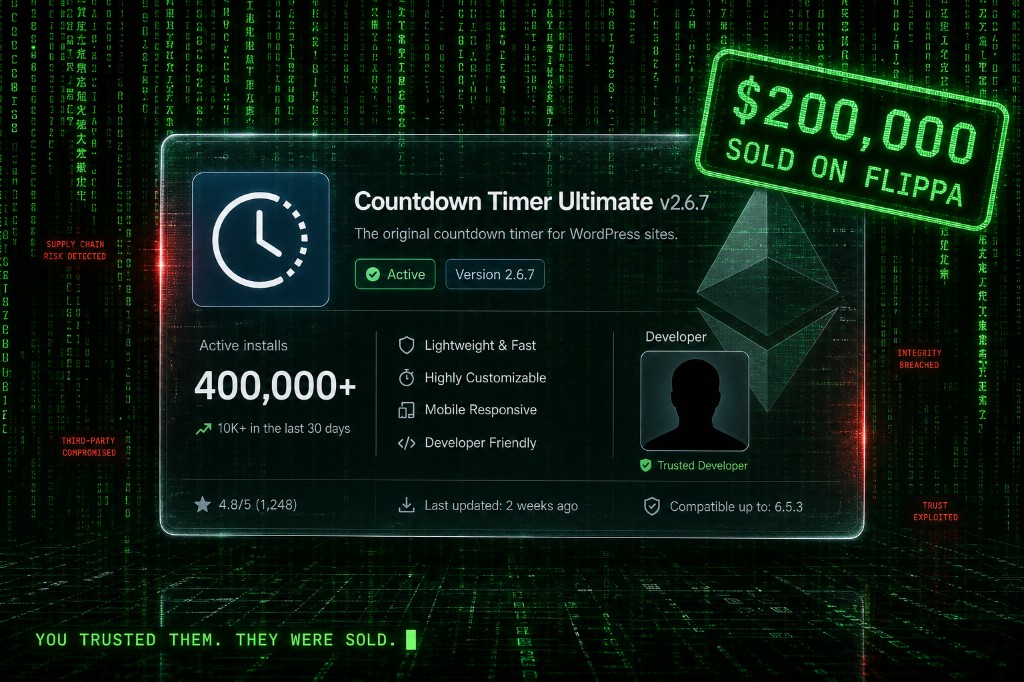
On 5 April 2026 at 3am UTC, a countdown plugin you installed in 2022 quietly fetched its first command from an Ethereum smart contract. By morning, your homepage was unchanged — but Googlebot was being served casino spam your visitors couldn't see. The plugin's previous owner sold it on Flippa nine months earlier. The new owner waited eight months between planting the backdoor and triggering it. Long enough that you forgot the plugin even updated. 400,000+ active WordPress sites are still infected as of this week, even though WordPress.org closed all 31 plugins on April 7th. TechCrunch broke it. We've spent the last month cleaning sites that got hit. Here is exactly how it worked, how to check if you're infected tonight, and why "WordPress.org killed the plugins" does not mean the crisis is over for you.
How Did the EssentialPlugin Backdoor Wake Up?
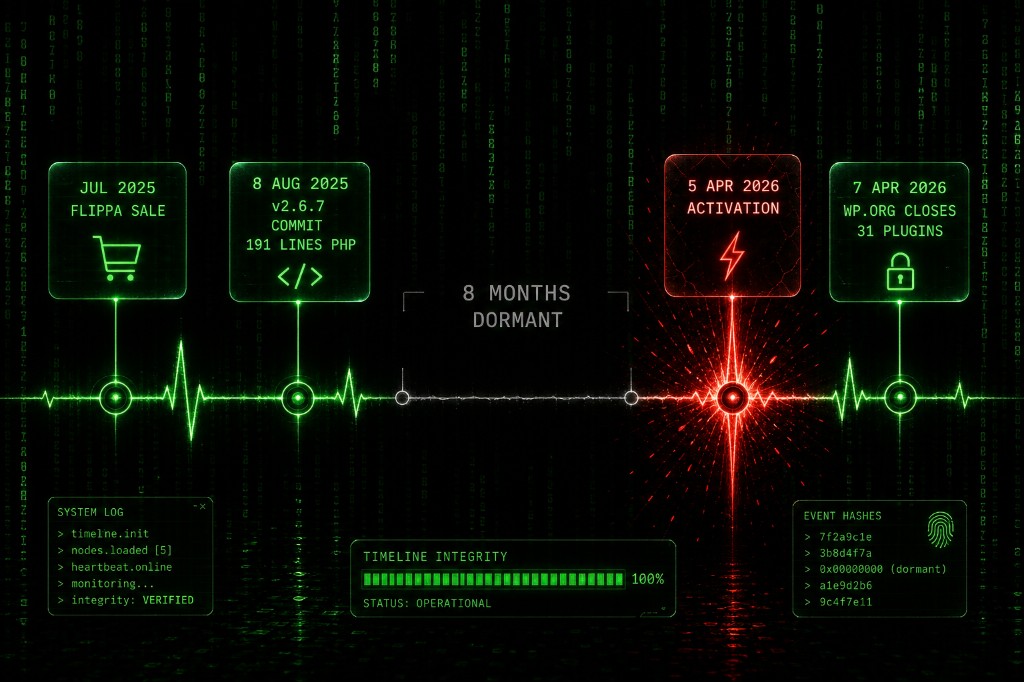
This is not a bug. This is a business model. A buyer using the alias "Kris" — background in SEO, crypto, and online gambling marketing — paid six figures on Flippa in July 2025 for the entire EssentialPlugin portfolio. Thirty-one plugins. Roughly 400,000 active installs. The original developer Minesh had listed the business after a 35–45% revenue decline. Kris closed in days.
One month later, on 8 August 2025, version 2.6.7 went out. The changelog read only: "Check compatibility with WordPress version 6.8.2." What it actually shipped was 191 lines of new PHP, including a deserialization (PHP object injection) backdoor. Then it went silent. WordPress auto-updates pushed it to your site. You never noticed. Nobody did.
Eight months later, on 5–6 April 2026, the dormant code finally phoned home to analytics.essentialplugin.com and started downloading payloads. The Agents* had been inside your site since summer. They just hadn't moved yet.
How Does a Flippa Auction End Up in Your wp-config.php?
The full mechanism, in five steps:
- Flippa sale, July 2025. Ownership transferred. WordPress.org has no notification system for site admins when a plugin changes hands. You weren't told. Your hosting provider wasn't told.
- Silent commit in v2.6.7, August 2025. 191 malicious lines added under a benign changelog. No code-signing on plugin updates means no automated catch.
- WordPress auto-updates pushed it to you. The same auto-update system you've been told for a decade is "essential for security" delivered the backdoor to 400,000 sites overnight.
- 5 April 2026 — activation. The plugin's
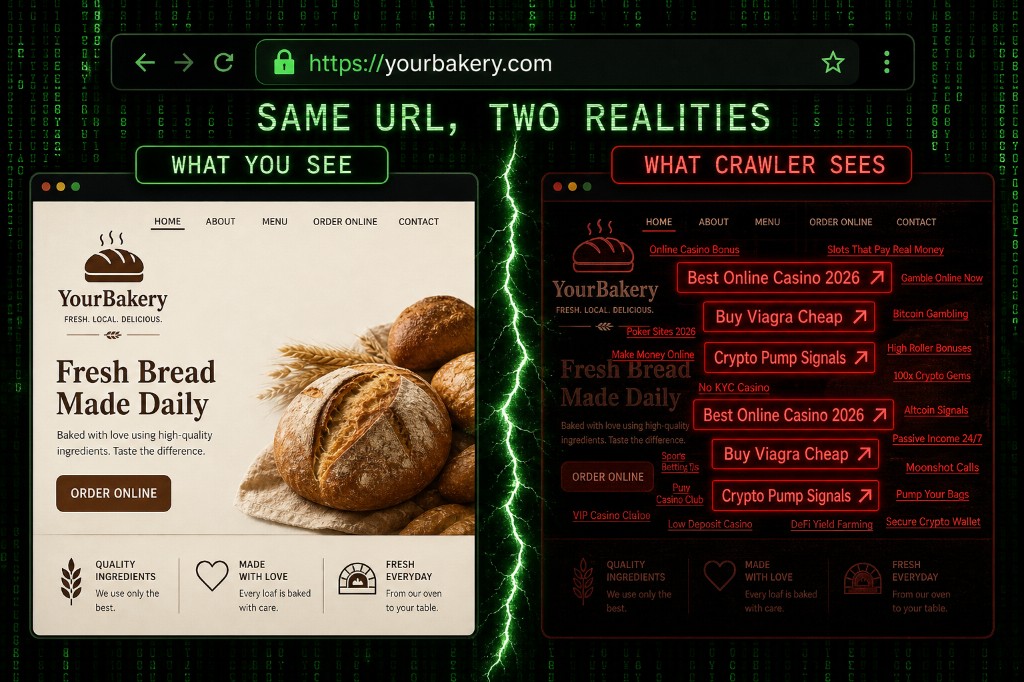
wpos-analyticsmodule phonedanalytics.essentialplugin.com, which served a payload namedwp-comments-posts.php(typo-squat of WordPress core'swp-comments-post.php— note the extras) into your webroot. That dropper then injected ~6KB of PHP directly into your wp-config.php. - Cloaking went live. The injected code reads the User-Agent. If the visitor identifies as Googlebot, it serves casino, crypto, and pharma SEO spam. If the visitor is a real human, it serves your site exactly as it was.
This last detail matters more than anything else: your site looks fine when you visit it. Googlebot sees something completely different. The first signal most owners get is a Search Console "Manual Action" warning — or a 60-day organic traffic crater. By then, recovery takes weeks.
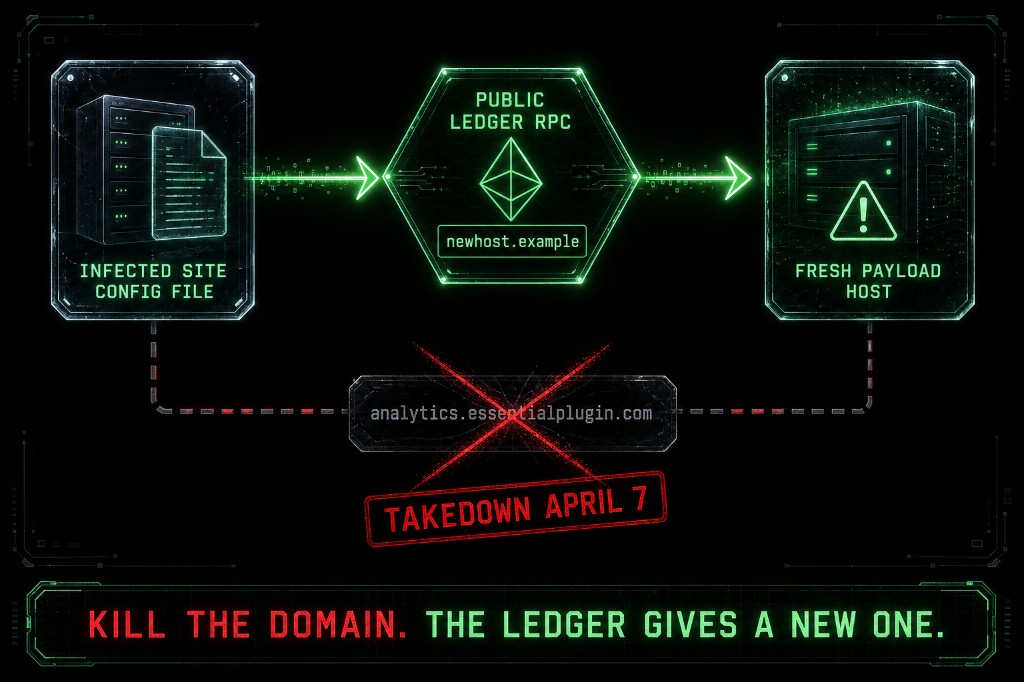
And then there's the part that turned this from a nasty incident into a structural problem. The malware doesn't trust a single domain to stay up. It resolves its next command-and-control domain by querying an Ethereum smart contract over public blockchain RPC endpoints. WordPress.org killed analytics.essentialplugin.com on April 7th. The infected sites kept polling. The blockchain returned the next attacker-controlled domain. The malware kept working.
You cannot take down a smart contract. The infrastructure is designed to outlive any one takedown. Every site that was infected before April 7th is still infected, still cloaking, still reaching for the next domain — until someone manually cleans the wp-config.php injection.
Which WordPress Plugins are Infected by the EssentialPlugin Backdoor?
No public source has the complete 31-plugin list. The names confirmed across multiple advisories include some plugins that almost certainly live on a site you maintain or own:
- Countdown Timer Ultimate
- Popup Anything on Click
- WP Testimonial with Widget
- WP Team Showcase and Slider
- Responsive WP FAQ with Category
- Hero Banner Ultimate
- Blog Designer – Post and Widget
- Album and Image Gallery plus Lightbox
- Woo Product Slider and Carousel with Category
- Video Gallery and Player
- Portfolio and Projects
- Footer Mega Grid Columns
- Audio Player with Playlist Ultimate
- Meta Slider and Carousel with Lightbox
- Ticker Ultimate
- PreLoader for Website
If you ever installed anything authored by "essentialplugin" on WP-Admin → Plugins, treat it as suspect. A small business is more exposed than an enterprise here, not less. Solo owners don't audit their plugin list monthly. The plugin from 2022 you forgot about is the one with the backdoor.
The 10-Minute Self-Check: Are You Infected Right Now?
If you can SFTP into your site and read a file, you can do this. If you can't, skip to the last section and call someone.
- Search your
wp-content/plugins/folder for any directory namedwpos-analytics. It is not a legitimate component of any clean plugin. If it exists anywhere, you're infected. - Search your webroot for
wp-comments-posts.php. Note the extras— WordPress core's file iswp-comments-post.php(no s). The version with the s is the dropper. There is no legitimate reason for it to exist. - Open
wp-config.php. The file should end at the linerequire_once ABSPATH . 'wp-settings.php';. Any executable PHP after that line is a red flag, especially blocks referencingHTTP_USER_AGENT,Googlebot, oressentialplugin.com. The injection is roughly 6KB. You will know it when you see it. - Open Google Search Console → Security Issues. If you have a "Manual Action" or a "Hacked: type 1" warning, you are confirmed cloaked. While you're there, run this Google query:
site:yourdomain.com casino(and the same with viagra, crypto, pharma). If results appear, your site is being indexed for spam keywords you never wrote about. - Check your
wp_userstable for admin accounts you didn't create. The dropper's most common follow-up is to add a hidden admin for persistence.
Five checks. About ten minutes if you've done them before. Triple that if it's your first time.
Why Do WordPress Plugin Backdoors Keep Happening?
Step back from the news. The EssentialPlugin attack is the third strike on the same unpatched ecosystem flaw, not the first.
- 2017 — Display Widgets. A buyer using alias "Daley Tias" bought the plugin (200,000 installs) for $15,000 and injected payday-loan spam. Same pattern. Smaller scale.
- 2024 — Wordfence-disclosed five-plugin compromise.
- March 2026 — ASE Pro hijack. Two weeks before EssentialPlugin.
- April 2026 — EssentialPlugin. 400,000 sites.
Every one to two years. Same flaw. Bigger blast radius. The structural diagnosis is short: WordPress.org has no plugin code-signing, no ownership-transfer review, and no notification to admins when a plugin changes hands. npm and PyPI added these guardrails years ago. The auto-update paradox is the kicker: you've been told for a decade to enable auto-updates because most hacks happen through unpatched known vulnerabilities. That's still true. And auto-updates are exactly what delivered this backdoor to 400,000 sites overnight. The fix isn't to turn off auto-updates. The fix is to add monitoring that watches what those updates actually do.
How Do You Clean and Remove the WordPress Plugin Backdoor?
Search Console takes two to four weeks to lift cloaking penalties once you submit a reconsideration request. Every day your site stays infected is a day Googlebot keeps seeing casino spam. Order of operations:
- Take the site offline. Maintenance mode. Don't let Googlebot keep getting spam during cleanup — that's how short-term penalties become permanent.
- Backup wp-config.php, wp-content/plugins/, and the database. Forensics first, before you touch anything.
- Manually delete the EssentialPlugin folder. WordPress.org force-pushed v2.6.9.1 on April 8th to disable phone-home, but it does not clean code already injected into wp-config.php. Updating to 2.6.9.1 is a bandaid on a corpse. Uninstall, don't update.
- Open wp-config.php. Delete every line after
require_once ABSPATH . 'wp-settings.php';. That line should be the last executable line in the file. - Delete
wp-comments-posts.phpfrom the webroot. - Rotate everything. All eight WordPress salts in wp-config.php (AUTH_KEY, SECURE_AUTH_KEY, etc.). All admin passwords. The database password if it appears in wp-config.php.
- Run a full Wordfence or Sucuri scan. Confirm the cleanup. These tools won't catch every bespoke obfuscation but they catch most of this incident.
- Submit a Search Console reconsideration request. Be honest about what happened. Google's reviewers see this pattern and respond fast when the cleanup is real.
If Search Console already flagged you, you may have lost 30–60 days of organic traffic. Cleanup speed determines how much of that you ever get back. Move tonight.
How Do ProWebCare's Operators* Secure Your Plugins?
We've cleaned over 3,000 hacked WordPress and Joomla sites. The EssentialPlugin pattern — silent ownership change, dormant backdoor, surprise activation — is not new to us. It's a category. Three signals an SMB cannot watch alone:
- Plugin ownership-change announcements. We cross-reference WordPress.org commit history and Flippa listings. A new committer on a plugin you use means we flag it before the next auto-update touches your site.
- Anomalous wp-config.php writes. That file should change only when you change it. Any other write triggers an alert and a manual review. The EssentialPlugin attack would have tripped this signal the night it activated — eight months earlier than Search Console would have warned anyone.
- Outbound traffic to blockchain RPC endpoints from your web server. Nobody legitimate is doing that. We know what to look for because the Agents* keep inventing it.
We can't prevent the next supply-chain attack from existing. We can prevent it from sitting in your wp-config.php for eight months unnoticed. That gap — between "compromised" and "discovered" — is where almost all the real damage happens, and it's the gap a maintenance plan closes.
Frequently Asked Questions
Probably yes if it ever updated to v2.6.7, v2.6.8, or v2.6.9.0 between August 2025 and April 8, 2026 — and WordPress auto-updates almost certainly pushed those versions to your site. Disabling the plugin is not enough. Open your wp-config.php and check for any code after require_once ABSPATH . 'wp-settings.php';. If you see PHP referencing Googlebot or essentialplugin.com, you're infected. Take the site offline, clean wp-config.php manually, delete the plugin folder, and run a full Wordfence scan before bringing it back up.
Because v2.6.9.1 only stops the plugin from phoning home. It does not remove the malicious code already written into your wp-config.php. The spam injection happened the moment activation hit your site — likely between April 5th and April 7th. The update did not roll that back. Your site is still cloaking spam to Googlebot until you manually clean wp-config.php and delete the dropped wp-comments-posts.php from your webroot.
Because the malware was designed to be invisible to you. It only shows the spam to Googlebot. You'll see your homepage. Google will see "best online casino bonuses 2026." The first signal most owners get is a Search Console "Manual Action" warning or a 60-day organic traffic crater. By then, recovery takes weeks. Check now: search Google for site:yourdomain.com casino and site:yourdomain.com viagra. If results appear, you're infected.
It didn't go through review the way you think. Once a plugin is approved, ongoing updates from the existing committer are not re-reviewed line-by-line. When the original developer sold the EssentialPlugin portfolio to "Kris" via Flippa in July 2025, the new owner inherited commit access. WordPress has no ownership-transfer review and no code-signing for updates. The 191 malicious lines were committed under a changelog that read only "Check compatibility with WordPress version 6.8.2." Nobody checked.
No. Disabling auto-updates means you also miss legitimate security patches — and most sites get hacked through unpatched known vulnerabilities, not through supply-chain attacks. The right answer is to keep auto-updates ON for core, but add monitoring that watches what those updates actually do — specifically, anomalous writes to wp-config.php and outbound traffic to unusual endpoints. Disabling auto-updates trades one risk for a bigger one.
Wordfence and Sucuri are excellent and will catch most of this incident — run one of them tonight if you've never run one. But they won't always catch a custom-injection block obfuscated to look like config code, and they won't warn you the next time a plugin you use changes ownership. For a one-time cleanup, free scanners are fine. For ongoing protection — the next dormant backdoor is already out there in someone's git diff — you need either a maintenance service or the discipline to manually audit every plugin you use every month. Most SMBs do neither.
Why ProWebCare's Operators* Are Watching wp-config.php for You
Every site we've cleaned in April 2026 had two things in common: an EssentialPlugin product installed, and a wp-config.php that hadn't been audited since launch. Both are easy to fix. Both are also easy to forget. That's the gap.
Our maintenance plans run file-integrity monitoring on wp-config.php and the WordPress core, plus weekly outbound-traffic audits that flag anomalous endpoints — the kind of signal that catches a smart-contract C2 the day it activates, not eight months later. Maintenance plans here.
If your site is already infected and you found one of the IOCs above tonight, don't wait for Search Console to make the call for you. Malware removal — we move tonight. 3,000+ hacked sites cleaned. WordPress and Joomla. Real Life* is for your customers. The Matrix* fight is what we do.