

🚨 Google just solved the biggest problem with AI-assisted coding: context loss.
It's called Conductor, and it's a preview extension for Gemini CLI that changes how AI agents* help you build software. Instead of losing project context across chat sessions, Conductor stores everything in persistent Markdown files. Your goals, constraints, tech choices, and workflow preferences become part of your repository. They're reviewable, reproducible, and shared across your team.
This isn't another chat tool. The Conductor extension for Gemini CLI introduces a planning-first workflow where you define specifications and implementation plans before generating code. It's built for real work: feature development, refactoring, and established projects where understanding existing structure matters. The Gemini CLI extension transforms AI-assisted coding from ad-hoc prompting to structured development.
As developers adapt to this new approach, understanding how website development and code quality work in a context-driven world becomes essential. The rules are changing. The Gemini CLI extension represents a fundamental shift in how AI assists with coding, moving from reactive chat sessions to proactive planning.
What Is Google Conductor?
Conductor is a preview extension for Gemini CLI that implements context-driven development. It shifts development context from transient conversations into persistent Markdown files stored directly in your repository. The Gemini CLI extension enables AI-assisted coding that maintains context across sessions.
Think of it like version control for AI context. Just as Git tracks code changes, Conductor tracks project context. Your product goals, architectural constraints, technology choices, and workflow preferences live in Markdown files. They become the shared source of truth for both developers and AI agents*. The Conductor extension for Gemini CLI makes this context persistent, version-controlled, and accessible through Git.
Conductor solves the context loss problem that plagues chat-based coding tools. When you start a new session, the AI doesn't remember your project structure, coding standards, or architectural decisions. The Conductor extension for Gemini CLI fixes this by making context persistent, reviewable, and reproducible. This transforms AI-assisted coding from session-based to project-based.
For teams building complex applications, this shift requires rethinking how development workflows integrate with AI assistance. The focus moves from ad-hoc prompting to structured planning. The Conductor extension for Gemini CLI enables this transformation by making context a first-class citizen in the coding workflow.
How Conductor Works: Tracks, Plans, and Persistent Context
Conductor introduces a core concept called tracks. A track represents a discrete unit of work—a feature, bug fix, or refactoring task. Each track includes:
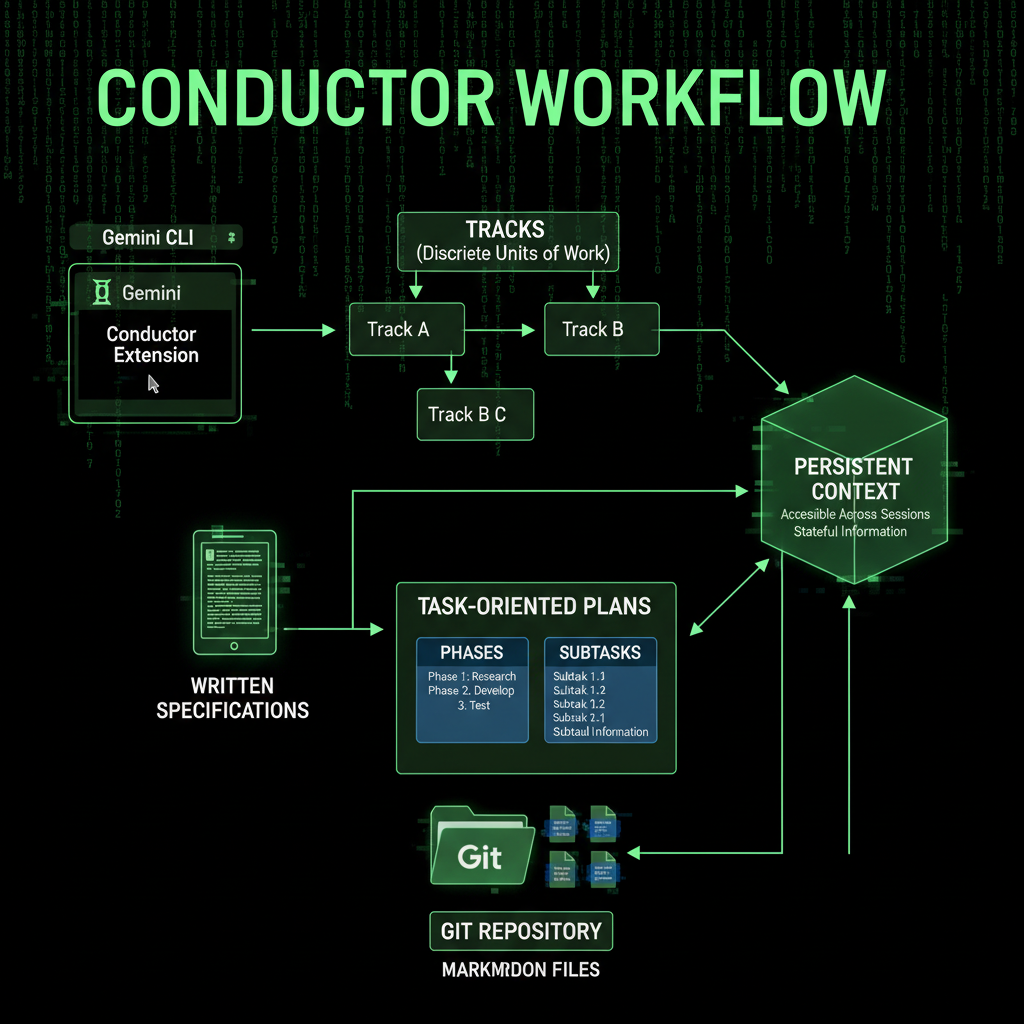
- Written Specification: What you're building and why
- Task-Oriented Plan: Broken into phases and subtasks
- Progress Tracking: Status updates directly in the plan file
Implementation proceeds only after the plan is reviewed. Because state is stored in the repository, work can be paused, resumed, or modified without losing context. This is the key difference from chat-based tools.
The Track-Based Workflow
Here's how a typical Conductor workflow looks:
- Create a Track: Define the work you need to do
- Write Specification: Document what you're building
- Create Implementation Plan: Break work into phases and subtasks
- Review Plan: Ensure the approach is sound
- Implement: Execute the plan with progress tracked in the plan file
This workflow encourages planning before coding. It's especially valuable for larger tasks where understanding existing structure and constraints is crucial. The Conductor extension for Gemini CLI makes this workflow seamless by storing all context in your repository, accessible through Git and version control. This planning-first approach transforms how developers approach coding, making AI-assisted development more predictable and maintainable.
Early users have highlighted the track-based workflow as a practical improvement over ad-hoc prompting. Devin Dickerson, an engineering and product leader at Forrester, said:
"My favorite thing about this extension is the tracks concept. I had been using the open source version of Conductor on my own prior to this release, and I ended up building my own feature slices. I can throw that away now that tracks are baked in."
Persistent Context in Markdown Files
Conductor stores project context in Markdown files within your repository. These files define:
- Product Goals: What you're building and why
- Architectural Constraints: Design decisions and limitations
- Technology Choices: Stack, frameworks, and tools
- Workflow Preferences: Testing strategies, coding conventions, and processes
This context persists across sessions. When you start a new Conductor session, it reads these files and understands your project immediately. No need to re-explain your architecture or coding standards. The Conductor extension for Gemini CLI treats these Markdown files as artifacts that define your project's source of truth. These artifacts are version-controlled through Git, making your entire development workflow traceable and reproducible.
For businesses maintaining complex codebases, this persistent context becomes critical. Understanding how maintenance workflows integrate with AI assistance requires structured context that survives across sessions.
Team-Wide Configuration and Standards
Conductor supports team-wide configuration. Projects can define shared standards once and apply them consistently to all AI-assisted contributions. This includes:
- Testing Strategies: Unit tests, integration tests, test coverage requirements
- Coding Conventions: Style guides, naming conventions, code organization
- Workflow Preferences: Git workflows, review processes, deployment practices
This makes Conductor relevant not only for individual developers but also for teams seeking consistency across contributors and machines. Everyone follows the same standards, and the AI enforces them. The Conductor extension for Gemini CLI ensures that AI-assisted coding produces consistent results across different developers and workspaces, making team collaboration seamless. This workflow standardization is crucial for teams working on complex codebases where consistency in coding practices matters.
Navid Farazmand, a developer experimenting with the preview, described the value:
"I immediately tried to create something similar with .md files when Gemini CLI came out. Conductor is an order of magnitude better—especially the test-driven-development approach it takes."
Planning-First Workflow: From Prompt to Plan to Code
Conductor encourages a planning-first workflow. Rather than moving directly from prompt to code, developers define specifications and implementation plans before invoking code generation. This workflow transforms AI-assisted coding from reactive to proactive.
This approach is intended to support larger tasks such as:
- Feature Development: New functionality that requires understanding existing codebase
- Refactoring: Improving code structure while maintaining behavior
- Established Projects: Work on codebases with existing architecture and constraints
For these tasks, understanding existing structure and constraints is crucial. Conductor's planning-first approach ensures the AI has full context before generating code. The Conductor extension for Gemini CLI makes this workflow natural by storing specs and plans as artifacts in your repository, accessible through Git version control.
Test-Driven Development Emphasis
Conductor emphasizes test-driven workflows. The planning phase includes test strategy, and implementation follows test-first principles. This ensures code quality and maintainability. The Conductor extension for Gemini CLI integrates test-driven development into the AI-assisted coding workflow, making quality a first-class concern. This approach to coding ensures that every feature is tested before deployment.
This aligns with best practices for professional development where tests drive design and catch regressions early. The Gemini CLI extension supports this by making test strategies part of the persistent context stored in your repository. When writing code with Conductor, the AI agent understands your testing requirements from the start, making the coding process more efficient.
Installation and Getting Started with Gemini CLI
Conductor is available as a preview extension for Gemini CLI. Installation is straightforward and requires the Gemini CLI to be set up first. The Conductor extension for Gemini CLI can be installed directly from GitHub.
Install Conductor Extension
Install the Conductor extension using the Gemini CLI:
gemini extensions install https://github.com/gemini-cli-extensions/conductor --auto-update
The --auto-update flag ensures the extension stays updated with the latest versions. The Conductor extension is available on GitHub at github.com/gemini-cli-extensions/conductor, where you can find documentation, examples, and contribute to the project. The GitHub repository includes installation instructions, API documentation, and examples of using the Gemini CLI extension for various coding tasks.
Initialize Conductor in Your Project
Set up Conductor in your project:
/conductor:setup
This command helps define core components of your project context, including product goals, guidelines, tech stack, and workflow preferences.
Create Your First Track
Start a new feature or bug fix:
/conductor:newTrack "Description of the feature or bug"
This generates specification and plan files for the new track.
Implement the Track
After reviewing and approving the plan, execute:
/conductor:implement
Conductor guides the implementation process, updating progress in the plan file.
Why Context-Driven Development Matters
Traditional chat-based AI coding tools have a fundamental limitation: they lose context across sessions. You start a new conversation, and the AI forgets your project structure, coding standards, or architectural decisions. You spend time re-explaining context that should be persistent. This makes AI-assisted coding inefficient and frustrating. Every time you start coding, you're essentially starting from scratch, explaining your codebase structure, coding conventions, and workflow preferences again.
Conductor solves this by making context persistent, reviewable, and reproducible. Your project context lives in Markdown files that are version-controlled, reviewed, and shared across your team. The Conductor extension for Gemini CLI transforms AI-assisted coding from session-based to project-based, making context a first-class citizen in your development workflow.
The Context Loss Problem
Without persistent context, AI-assisted development becomes inefficient:
- Repeated Explanations: You explain your architecture, standards, and preferences in every session when coding with AI
- Inconsistent Output: The AI generates code that doesn't match your coding conventions, requiring manual fixes
- Lost Knowledge: Decisions and rationale disappear when sessions end, making it hard to maintain context while writing code
- Team Inconsistency: Different developers get different results from the same AI, making AI-assisted coding unpredictable across the team
Conductor eliminates these problems by storing context in the repository where it belongs.
The Planning-First Advantage
Planning before coding has always been a best practice. Conductor enforces this by requiring specifications and implementation plans before code generation. This ensures:
- Better Architecture: Plans are reviewed before implementation
- Clearer Intent: Specifications document what you're building and why
- Progress Tracking: Status updates in plan files provide visibility
- Reproducibility: Plans can be reviewed, modified, and reused
For teams managing complex projects, this planning-first approach becomes essential. Understanding how maintenance and development workflows integrate with AI assistance requires structured planning. The Gemini CLI extension makes this workflow natural, whether you're working on greenfield projects or brownfield codebases that need refactoring. The Conductor extension handles both scenarios, making it valuable for any coding project.
Real-World Applications and Use Cases
Conductor is designed for real development work. Here are scenarios where it shines:
Feature Development
When building new features, Conductor helps you:
- Understand existing codebase structure through persistent context stored in your repository
- Plan feature implementation with full context using the Conductor extension for Gemini CLI
- Follow established coding standards and patterns enforced by the AI agent while writing code
- Track progress through phases and subtasks in plan files stored in your repository, accessible via Git
The workflow for coding with Conductor is straightforward: define your track, create a spec, plan the implementation, review the plan, then start coding. The Gemini CLI extension guides you through each step, ensuring your coding process is structured and efficient.
Refactoring
Refactoring requires deep understanding of existing code. Conductor's persistent context ensures the AI agent understands:
- Current architecture and design patterns stored in repository artifacts
- Code organization and structure across the entire codebase
- Dependencies and relationships tracked in Git
- Testing requirements and coverage defined in workflow preferences
Team Collaboration
Conductor's team-wide configuration ensures consistency:
- All developers follow the same standards enforced by the Conductor extension for Gemini CLI
- AI-generated code matches team conventions across all workspaces, making coding more predictable
- Context is shared and reviewable through Git version control, accessible from any workspace
- Onboarding new team members is easier with persistent context artifacts that explain the codebase structure
This workflow standardization is especially valuable for teams working with Google Cloud or other cloud platforms, where consistent coding practices across different environments matter. The Gemini CLI extension ensures that whether you're coding locally or deploying to production, the same standards apply.
Limitations and Future Development
Conductor is currently in preview. Google has positioned the release as an initial step, with further refinements planned as feedback from developers and teams informs future iterations.
Current limitations include:
- Preview Status: The extension is still evolving based on user feedback
- Learning Curve: Teams need to adapt to planning-first workflows
- Markdown Management: Context files require maintenance and updates
However, early users report significant improvements over ad-hoc prompting, especially for larger tasks and team collaboration.
Conclusion: The Future of AI-Assisted Development
Google Conductor represents a shift in how AI assists software development. By making context persistent, reviewable, and reproducible, Conductor solves the fundamental problem of context loss in chat-based tools. The Conductor extension for Gemini CLI transforms AI-assisted coding from reactive to proactive, making the coding process more efficient.
The planning-first workflow encourages better architecture, clearer intent, and more maintainable code. Team-wide configuration ensures consistency across contributors and machines. The Conductor extension for Gemini CLI makes this workflow natural by storing all context in your repository, accessible through Git. This approach to coding ensures that every developer follows the same standards, whether they're working on new features or maintaining existing codebases.
For developers and teams building complex applications, Conductor offers a structured approach to AI-assisted development that scales beyond individual chat sessions. The Gemini CLI extension enables agentic development where AI agents* work with persistent context, making coding more efficient and predictable. The GitHub repository for the Conductor extension provides examples and API documentation for integrating this workflow into your coding process.
As the preview evolves based on user feedback, Conductor has the potential to become the standard way teams integrate AI assistance into their development workflows.
If you're building or maintaining complex applications, understanding how development workflows and maintenance processes integrate with AI assistance becomes essential. The rules are changing, and Conductor is leading the way.
Frequently Asked Questions
What is Google Conductor?
Google Conductor is a preview extension for Gemini CLI that implements context-driven development. It stores project context in persistent Markdown files, enabling AI-assisted development that maintains context across sessions and supports team-wide configuration.
How does Conductor solve the context loss problem?
Conductor stores project context—product goals, architectural constraints, technology choices, and workflow preferences—in Markdown files within your repository. This context persists across sessions, making it reviewable, reproducible, and shared across your team.
What is a track in Conductor?
A track is a discrete unit of work in Conductor. Each track includes a written specification and a task-oriented plan broken into phases and subtasks. Implementation proceeds only after the plan is reviewed, with progress tracked directly in the plan file.
How does Conductor support team collaboration?
Conductor supports team-wide configuration where projects define shared standards—testing strategies, coding conventions, and workflow preferences—once and apply them consistently to all AI-assisted contributions. This ensures consistency across contributors and machines.
What is the planning-first workflow?
The planning-first workflow requires developers to define specifications and implementation plans before invoking code generation. This approach supports larger tasks where understanding existing structure and constraints is crucial, ensuring better architecture and clearer intent.
How do I install Conductor?
Install the Conductor extension for Gemini CLI using: gemini extensions install https://github.com/gemini-cli-extensions/conductor --auto-update. The extension is available on GitHub at github.com/gemini-cli-extensions/conductor. Then initialize it in your project with /conductor:setup and create your first track with /conductor:newTrack "Description". The Gemini CLI extension will guide you through the setup process.
Is Conductor suitable for individual developers or only teams?
Conductor is valuable for both individual developers and teams. Individual developers benefit from persistent context and planning-first workflows, while teams benefit from shared standards and consistent AI-generated code across contributors.
