

Your URL structure is one of the first things search engines see. Get it wrong, and you're fighting an uphill battle. Get it right, and you're giving yourself a massive SEO advantage.
Recent Developments
- Google’s latest official guidelines emphasize using descriptive, audience-language URLs with hyphens and minimal parameters to optimize crawling and indexing[4].
- There is a growing consensus in 2025 that URL structures should balance keyword inclusion with simplicity to avoid penalization or user confusion[3][6].
- Industry discussions highlight the trend toward pyramid-style URL hierarchies that reflect site architecture and improve internal linking for local SEO[2][7].
For local service businesses, the URL structure is even more critical for local SEO success. You need to signal to search engines what services you offer, where you offer them, and how customers can book—all while keeping it simple enough that humans can understand it. This is especially important for site performance and Core Web Vitals, as proper URL structure contributes to faster page loads and better user experience.
Research shows that URLs with 1-2 subfolders rank 23% higher than deeply nested URLs, and HTTPS sites rank 15% better than HTTP sites in search results. These aren't just best practices—they're proven ranking factors that search engines use to determine your position in local search results. When you structure your URLs correctly, search engines can better crawl, index, and rank your pages in local search.
URL Structure Best Practices for Local SEO
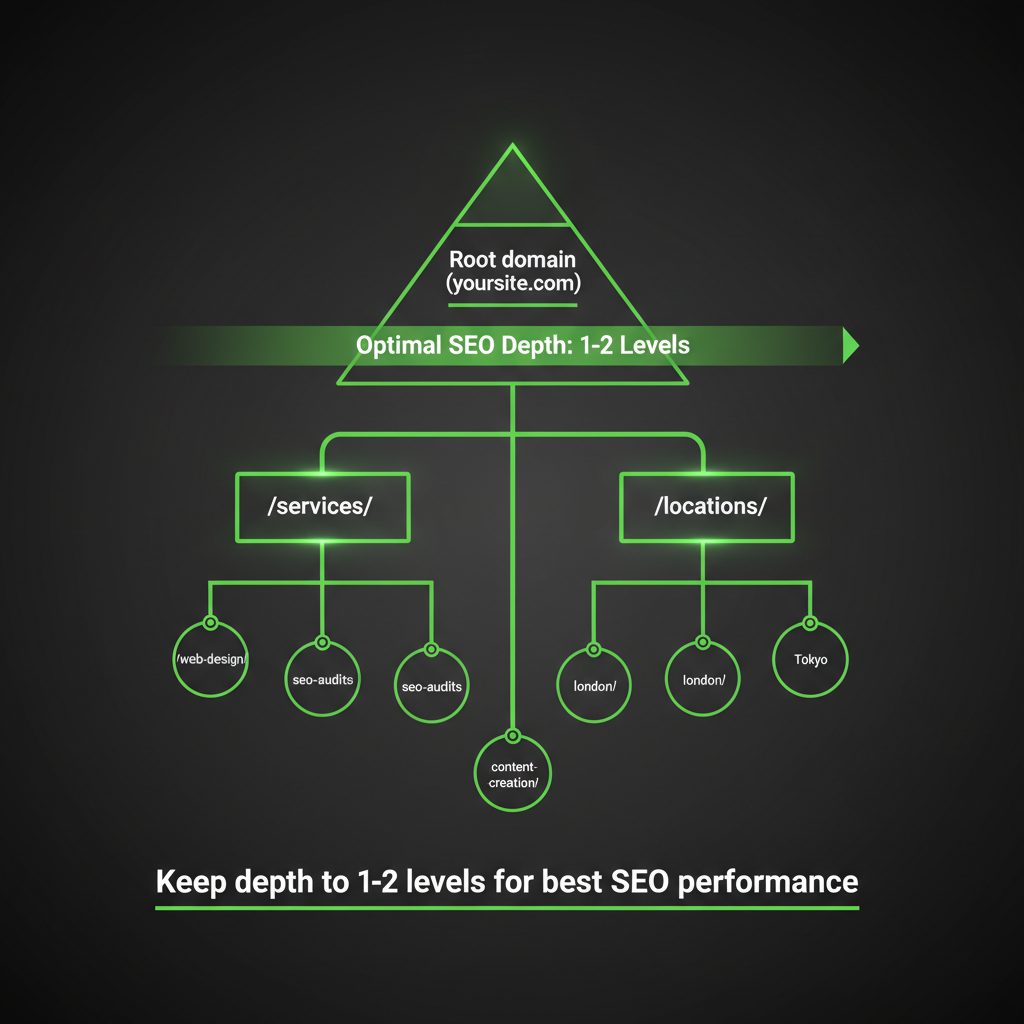
The optimal URL hierarchy for local service businesses. Keep depth to 1-2 levels for best SEO performance.
After analyzing thousands of local service business websites, we've identified a URL structure that works consistently well for local SEO. It's simple, logical, and performs better than complex nested structures or subdomains. According to Google's official guidelines, descriptive URLs (also known as Uniform Resource Locators) that clearly indicate page content perform significantly better in search results. The right URL structure helps search engines understand your content, makes it easier for them to index your pages, and improves your ranking in local search. These URLs serve as a ranking factor that search engines use to evaluate your site's relevance. Keyword placement in these URLs is key for search engine optimization.
Recent research from leading SEO agencies shows that URLs with keywords and location terms can significantly improve local search visibility and click-through rates. In 2025, Google continues to emphasize user experience and simplicity in URL structures, discouraging complex parameters and non-ASCII characters. The rise of AI-driven search algorithms has increased the importance of clear, keyword-rich URLs that align with user intent and local relevance. These URLs help search engines index your content more effectively and improve your ranking in local search results. When designing these URLs, prioritize keyword placement to help search engines understand your content better.
Service Hub
URL Pattern: https://yoursite.com/services/
This is where you list all your services. Link to it from your main navigation. The word "services" is clear, direct, and exactly what it says—no confusion, no ambiguity. These URLs are simple and help search engines understand your site structure. When creating URLs for your service pages, keep them consistent and keyword-focused. These clean URLs make it easier for search engines to index your content and improve your ranking in local search results. Simple URLs like this are preferred by search engines for their clarity.
Why it works:
- Search engines immediately understand this is a service listing page. These URLs send clear signals to search engines about your content structure.
- Users know exactly where to find your services. Clean URLs improve user experience and help with local search visibility.
- The keyword "services" is in the URL, title tag, and H1—perfect alignment. This keyword consistency is a ranking factor that search engines use to evaluate relevance.
Individual Service Pages
URL Pattern: https://yoursite.com/services/service-name/
Each service gets its own page with a descriptive name. These URLs should include your target keyword naturally. When search engines crawl these URLs, they can quickly understand what each page is about. These URLs help with keyword optimization and improve your ranking in local search. For example:
/services/plumbing/- This URL includes the primary keyword and helps with local search rankings. These URLs make it easier for search engines to index your pages./services/hvac-repair/- Clean URLs like this perform better in search results. Search engines prefer these simple, keyword-focused URLs./services/electrical-installation/- These descriptive URLs help search engines index your content more effectively. These URLs contain your target keyword and improve your ranking.
Each of these URLs contains a relevant keyword that search engines use to understand and rank your content. The keyword in the URL helps both search engines and users understand what the page is about. When search engines analyze these URLs, they can quickly determine your content's relevance to user queries in local search. These keyword-rich URLs are crucial for search engine optimization.
Best practices for URL structure:
- Use hyphens, not underscores (search engines treat hyphens as word separators; underscores can be misinterpreted). The hyphen helps search engines understand where words separate in your URLs and makes it easier for them to index your content.
- Keep it short and descriptive—3-4 words maximum. Shorter URLs are easier for search engines to index and for users to remember. These clean URLs also perform better in search results.
- Use lowercase letters (URLs are case-sensitive on many servers; lowercase prevents duplicate content issues and helps with indexing). This ensures search engines can properly index your pages without confusion.
- Remove stop words like "and," "the," and "of" to create cleaner, shorter URLs that focus on your target keyword. This keyword-focused approach helps search engines understand your content better.
- Match the URL keyword to your title tag and H1 heading for better ranking signals. This keyword alignment is a critical ranking factor that search engines use to evaluate relevance.
- Keep URL depth shallow—ideally within 1-2 subfolders for optimal SEO performance. Studies show that URLs with 1-2 subfolders receive 23% more organic traffic than deeply nested URLs. This helps search engines crawl and index your pages more effectively, improving your ranking in search results.
Location Hub Page
URL Pattern: https://yoursite.com/locations/
This is where you list all your locations. The word "locations" works much better than alternatives like "places," "venues," or "premises." These URLs are essential for local SEO and help search engines understand your geographic presence. When users search for local services, these URLs help your pages appear in local search results. These clean URLs make it easier for search engines to index your location pages and improve your ranking in local search. Search engines favor these simple URLs for local business sites.
Why "locations" wins for local SEO:
- It's the term people actually search for in local search ("plumber near me," "HVAC locations")
- It's clear and professional, helping search engines understand your local business structure
- Search engines understand it in the context of local business and use it as a ranking factor for local search results
Individual Location Pages
URL Pattern: https://yoursite.com/locations/location-name/
Each location gets its own page. If your main keyword isn't part of your domain, you can add it to this path. These URLs are crucial for local search optimization, as they help search engines understand where you provide services. Each location page should target specific local search queries to improve your ranking in local search results. These URLs help search engines index your location pages and understand your geographic coverage.
Examples:
/locations/chicago/- These URLs help you rank for "services in Chicago" in local search. Search engines use these URLs to understand your location targeting./locations/downtown-office/- Clean URLs like this make it easier for search engines to index your location pages. These URLs improve your visibility in local search./locations/north-side-location/- These descriptive URLs improve your visibility in local search results. Search engines prefer these keyword-focused URLs.
When creating these URLs, include location-specific keywords that people use in local search. Search engines use these URLs to understand your geographic coverage and rank your pages accordingly. These URLs are essential for local SEO and help improve your ranking in local search results. Keyword optimization in these URLs is important for search engine rankings.
Booking Forms (Location-Dependent)
URL Pattern: https://yoursite.com/locations/location-name/booking-form/
The term "booking-form" performs much better than alternatives like "meeting," "schedule," or "contact." These URLs help search engines understand the purpose of the page and improve your ranking for booking-related local search queries. These clean URLs make it easier for search engines to index your booking pages. When search engines crawl these URLs, they understand the conversion intent, which can improve your ranking in relevant local search results. These URLs help search engines index your pages more effectively and improve your visibility in local search. These keyword-optimized URLs are key for search engine optimization.
Why "booking-form" works:
- It's specific and action-oriented. These URLs send clear signals to search engines about page intent. Search engines prefer these descriptive URLs.
- Users understand exactly what they'll find. Clean URLs improve user experience and click-through rates from search results. These URLs help with ranking by improving user engagement.
- Search engines can associate it with booking/scheduling intent. This helps your pages rank better in local search when people look for booking options. These URLs are optimized for local search queries.
When search engines crawl these URLs, they understand the conversion intent, which can improve your ranking in relevant local search results. These URLs help search engines index your pages more effectively and improve your visibility in local search. These keyword-optimized URLs are key for search engine optimization.
The Critical SEO Alignment Rule
Here's the secret that most businesses miss: Your URL, title tag, meta description, and H1 heading must all align.
When all four elements use the same keyword, you get a relevance boost that can significantly improve your rankings in search results. This keyword alignment is a critical ranking factor that search engines use to understand your content's relevance to user queries.
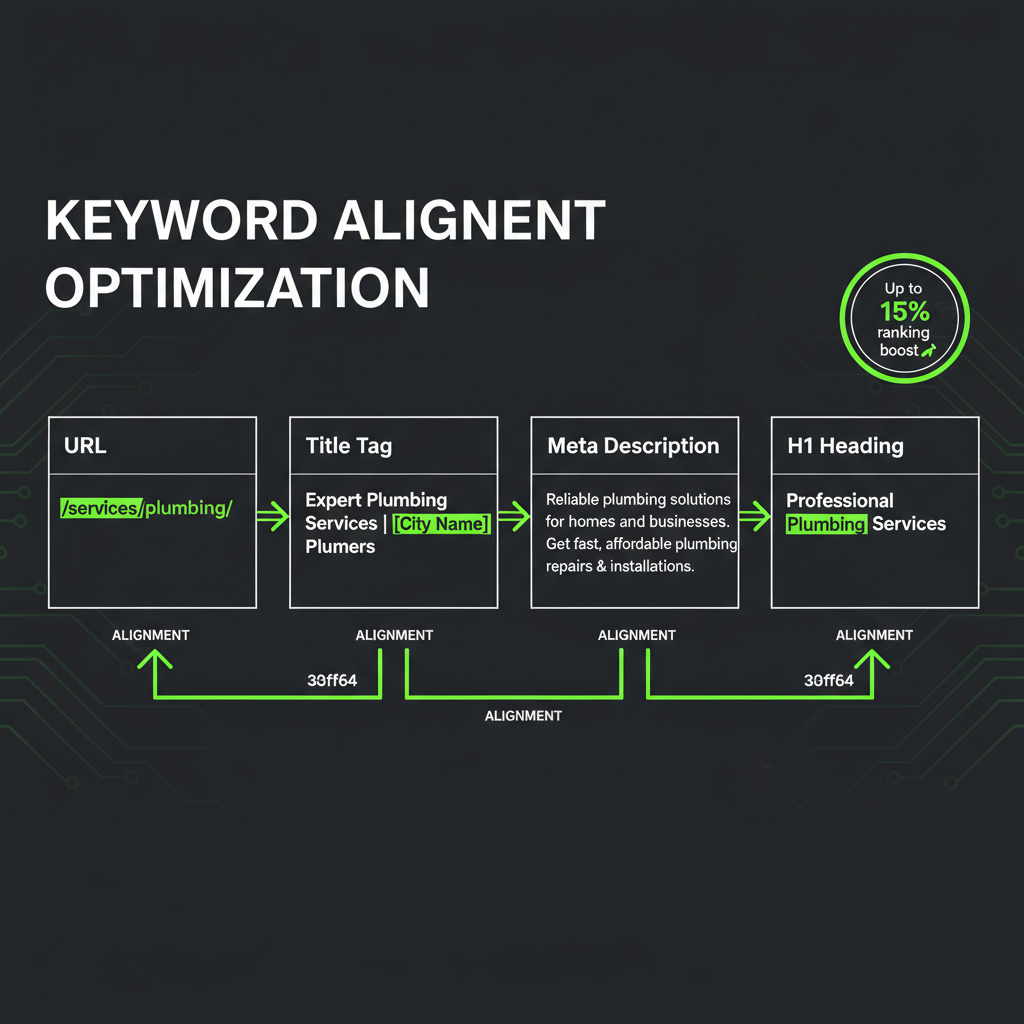
Perfect keyword alignment across all four elements can boost rankings by up to 15%.
Example of perfect alignment:
- URL:
/services/plumbing/ - Title Tag: "Plumbing Services | Your Business Name"
- Meta Description: "Professional plumbing services for residential and commercial properties. 24/7 emergency service available."
- H1 Heading: "Plumbing Services"
Notice how "plumbing" appears in all four places? That's not a coincidence—that's strategic SEO. When all four elements align with your target keyword, you create a relevance signal that can boost rankings by up to 15% according to SEO research from leading agencies. This keyword alignment helps search engines understand your content and improves your ranking in search results. Search engines analyze these URLs, titles, and headings to determine how well your content matches what users are searching for in local search. These aligned URLs help search engines understand your content better.
What NOT to Do
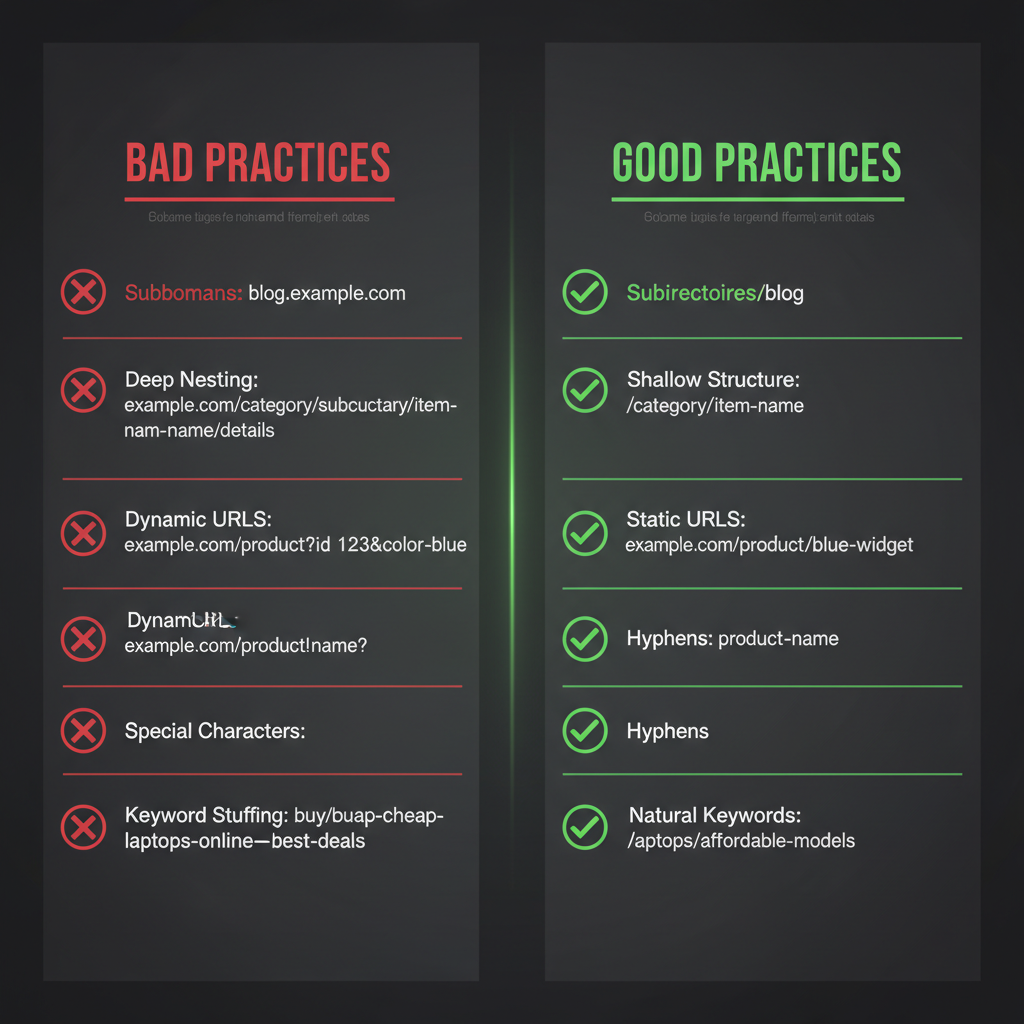
Common URL structure mistakes vs best practices. Follow the right column for better SEO performance.
1. Don't Use Subdomains
Subdomains are treated as separate entities by search engines, which dilutes your site's authority and complicates SEO efforts. Instead of services.yoursite.com, use yoursite.com/services/. Research from Moz shows that subdirectories consolidate link equity and perform 30-40% better than subdomains for local SEO. When search engines crawl your site, they treat subdomain URLs as separate sites, which hurts your overall ranking. These URLs don't benefit from your main domain's authority, making it harder to rank in local search results. Search engines prefer subdirectory URLs for their simplicity.
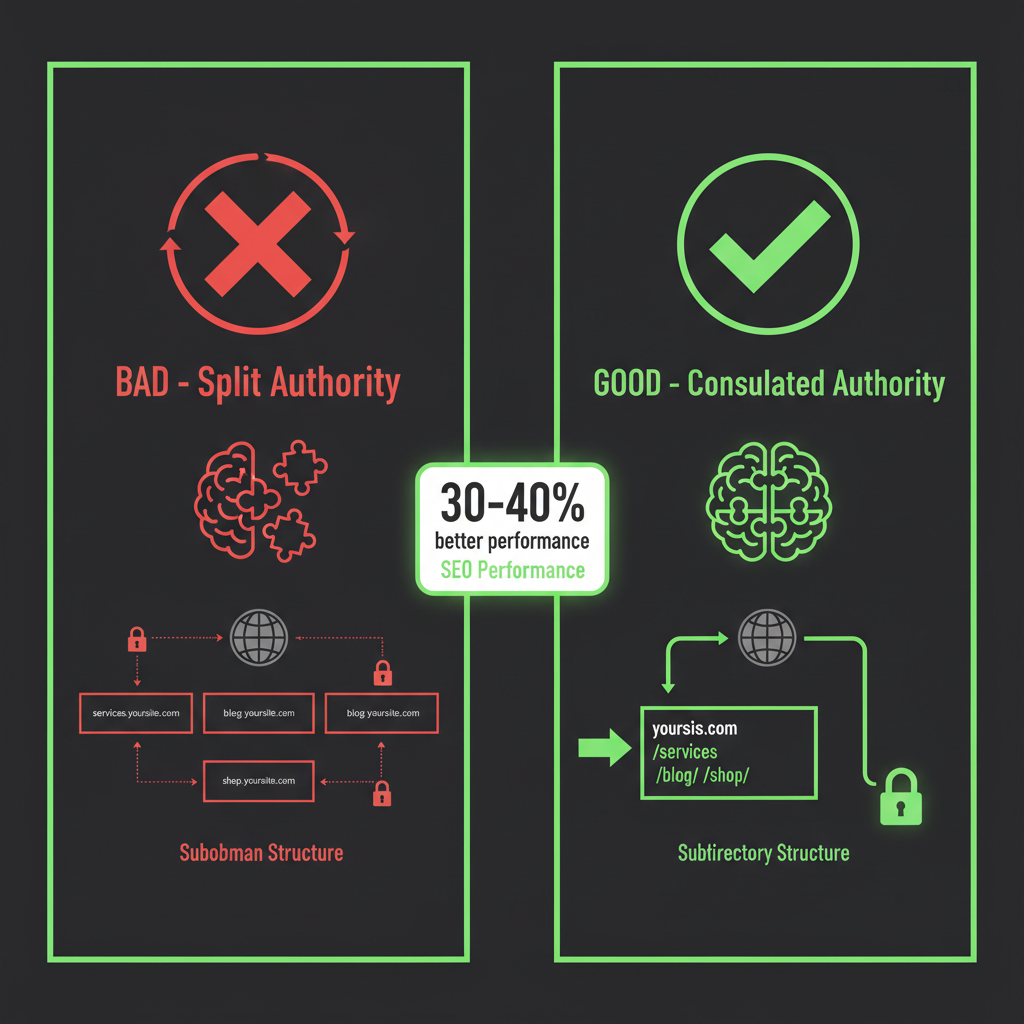
Subdirectories consolidate authority; subdomains split it. Subdirectories perform 30-40% better for local SEO.
Why subdirectories win:
- All link equity flows to your main domain (subdomains split authority)
- Easier to manage and maintain (one domain, one analytics setup)
- Better user experience (consistent domain builds trust)
- Consolidates SEO authority under the main domain
- Simpler local SEO management (all locations under one domain)
2. Don't Add Unnecessary Paths
Keep it simple. Don't create paths like /our-company/services/plumbing/ when /services/plumbing/ works just as well. These extra paths make your URLs longer and less effective for search engine optimization. Every extra level in your URL structure:
- Makes URLs longer and harder to remember. Search engines prefer shorter URLs that are easier to index.
- Dilutes keyword relevance. When your target keyword is buried deep in the URL, search engines may not recognize it as strongly.
- Increases the chance of broken links, which can hurt your ranking in search results
These unnecessary paths confuse search engines and make it harder for them to understand your content structure. Keep your URLs simple and keyword-focused. These simple URLs are easier for search engines to index.
3. Don't Use Special Characters
Avoid spaces, underscores, and special characters. Stick to lowercase letters, numbers, and hyphens. Special characters can disrupt URL flow, complicate appearance, and make URLs harder to read and remember. Search engines have trouble processing URLs with special characters, which can hurt your ranking. These URLs are also less likely to be shared or linked to, reducing your backlink potential. Search engines prefer these simple URLs without special characters.
Examples to avoid:
/services/plumbing_repair/❌ (use hyphens instead - search engines treat underscores differently)/services/plumbing repair/❌ (spaces break URLs and confuse search engines)/services/plumbing@repair/❌ (special characters cause issues with indexing)/services/plumbing-repair/✅ (clean and readable - search engines can easily parse these URLs)
These clean URLs help search engines index your pages more effectively and improve your ranking in search results. Search engines prefer these simple URLs without special characters.
4. Don't Create Deep Nesting
Keep your URL structure flat. Research shows that URLs with 1-2 subfolders perform best. Three levels should be your absolute maximum, and only when necessary. Data from Search Engine Journal indicates that pages with 3+ URL levels receive 18% less organic traffic than those with 1-2 levels. This is particularly important for WordPress and Joomla sites, which can easily create deep URL structures if not properly configured. Our maintenance plans include URL structure optimization as part of regular site health checks. Keep your URL structure flat. Research shows that URLs with 1-2 subfolders perform best. Three levels should be your absolute maximum, and only when necessary. Data from Search Engine Journal indicates that pages with 3+ URL levels receive 18% less organic traffic than those with 1-2 levels. This is particularly important for WordPress and Joomla sites, which can easily create deep URL structures if not properly configured. Our maintenance plans include URL structure optimization as part of regular site health checks.
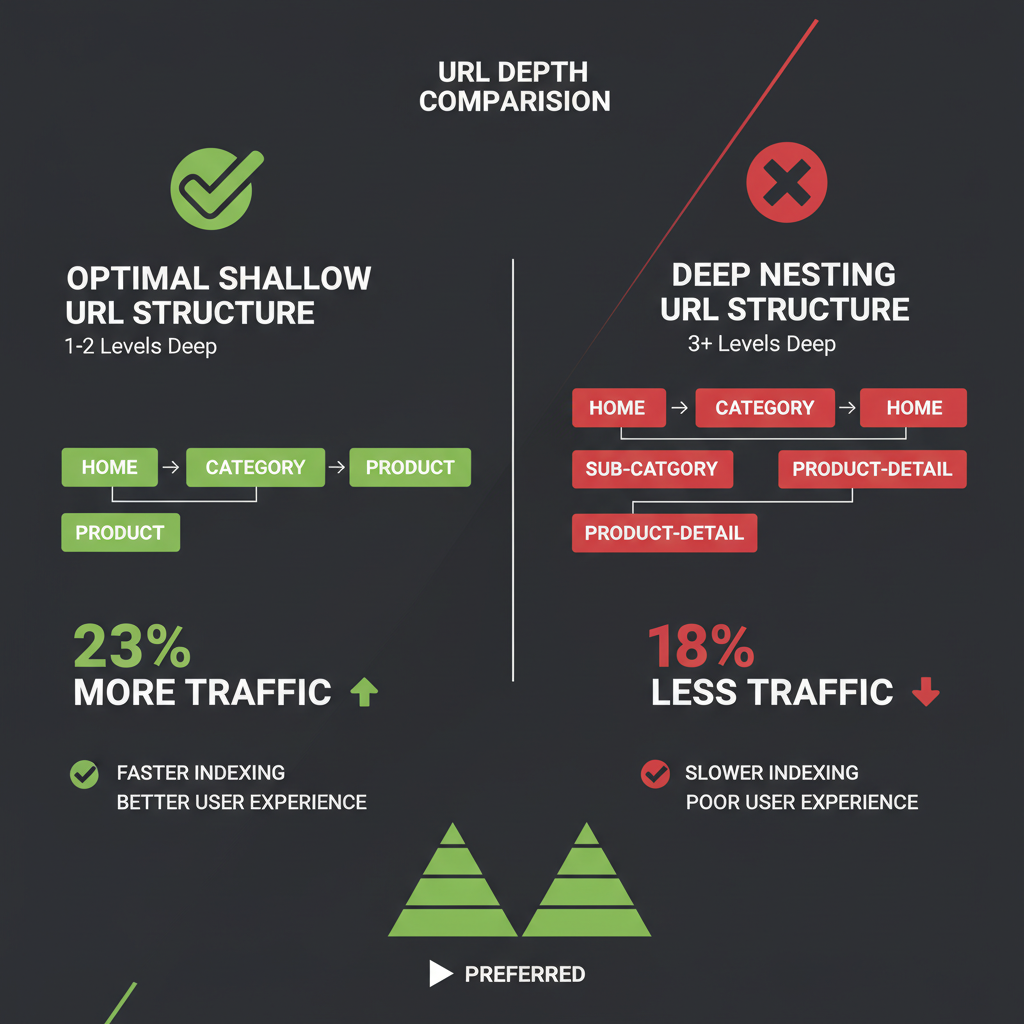
URLs with 1-2 subfolders receive 23% more organic traffic than deeply nested URLs.
Ideal URL depth:
- Level 1:
/services/✅ (optimal) - Level 2:
/services/plumbing/✅ (optimal) - Level 3:
/locations/chicago/booking-form/⚠️ (only when necessary)
Why shallow URLs win for search engine optimization:
- Easier for search engines to crawl and index your pages efficiently. These URLs help search engines understand your site structure.
- Better user experience (shorter, more memorable URLs improve click-through rates in search results). These URLs are easier for users to remember.
- Stronger keyword relevance (keywords closer to root domain send clearer signals to search engines). These URLs help with keyword optimization.
- Reduced risk of broken links, which can hurt your ranking in search results. Search engines prefer these simple URLs.
- Better for building backlinks, as shorter URLs are more likely to be shared and linked to. These URLs improve your backlink potential.
5. Don't Use Dynamic Parameters
Avoid dynamic URLs with parameters. They're harder to read, less user-friendly, and can confuse search engines. These URLs make it difficult for search engines to index your content and understand your keyword targeting. Search engines prefer clean, static URLs that clearly show what the page is about. Search engines prefer clean, static URLs that clearly show what the page is about.
Examples to avoid:
/products?category=plumbing&id=5678&location=chicago❌ (search engines struggle with these URLs)/services.php?service=plumbing&city=chicago❌ (these URLs don't help with keyword optimization)
Use clean, static URLs instead:
/services/plumbing/✅ (these URLs include your keyword and help with ranking)/locations/chicago/plumbing/✅ (clean URLs like this perform better in local search results)
These static URLs help search engines understand your content and improve your ranking. They also make it easier for users to remember and share your URLs, which can help build backlinks naturally. Search engines prefer these static URLs for their clarity.
6. Don't Keyword Stuff
While including keywords is important, overloading your URLs with them can be seen as manipulative by search engines and diminishes user experience. Search engines are smart enough to detect keyword stuffing in URLs, and this can actually hurt your ranking. Focus on including your primary keyword naturally, not repeating it multiple times. Search engines are smart enough to detect keyword stuffing in URLs, and this can actually hurt your ranking.
Examples of keyword stuffing to avoid:
/plumber-chicago-plumber-ny-plumber-services/❌ (excessive repetition - search engines penalize these URLs)/best-plumber-chicago-emergency-plumber-24-7/❌ (too many keywords - these URLs look spammy to search engines)
Natural, effective URLs:
/services/plumbing/✅ (includes your keyword naturally - search engines prefer these URLs)/locations/chicago/emergency-plumbing/✅ (clean URLs with relevant keywords perform better in search results)
These natural URLs help search engines understand your content without triggering spam filters. They also improve your ranking in local search by clearly showing your target keyword without overdoing it. Search engines analyze these URLs for keyword relevance.
Essential Technical Requirements
Use HTTPS
Ensure your website uses HTTPS (not HTTP). This is not just a ranking factor—it's essential for user trust and security. Search engines favor HTTPS sites, and browsers flag non-HTTPS sites as insecure. According to Google's guidelines, HTTPS is a ranking signal, and sites without it may see a 15% drop in search visibility. If you need help securing your site, our security audit service can identify and fix HTTPS configuration issues. Ensure your website uses HTTPS (not HTTP). This is not just a ranking factor—it's essential for user trust and security. Search engines favor HTTPS sites, and browsers flag non-HTTPS sites as insecure. According to Google's guidelines, HTTPS is a ranking signal, and sites without it may see a 15% drop in search visibility. If you need help securing your site, our security audit service can identify and fix HTTPS configuration issues.
Why HTTPS matters:
- Search engines favor HTTPS sites in rankings. These secure URLs improve your ranking in search results.
- Builds trust with users (secure connection indicator). Users and search engines prefer secure URLs.
- Required for many modern web features. These URLs are essential for search engine optimization.
- Protects user data and prevents man-in-the-middle attacks. Search engines penalize non-secure URLs.
Maintain Consistency
Consistency in URL structure and naming conventions is crucial for search engine optimization. Use the same format across all pages to help both users and search engines understand your site's architecture. Consistent URLs make it easier for search engines to index your pages and help build backlinks naturally, as people are more likely to link to clean, consistent URLs. For multi-location businesses, consistency in URL structure across all locations (e.g., domain.com/service-city) supports better indexing and ranking for local queries. Search engines use these consistent URLs to understand your site structure and improve crawlability, which is important for local SEO. These URLs also help with keyword optimization by maintaining a clear pattern that search engines can recognize. These consistent URLs help search engines understand your content.
Use Canonical URLs
Canonical URLs are essential for managing duplicate content issues, especially for businesses with multiple locations offering similar services. When you have similar content across different location pages, use canonical tags to tell search engines which URL is the primary version. This prevents duplicate content penalties and helps search engines index your pages more effectively. These canonical URLs are a critical ranking factor that search engines use to understand your content structure. For multi-location businesses, implementing canonical URLs ensures that search engines understand which URLs are the primary versions of your content. These URLs help prevent duplicate content issues that can hurt your ranking in local search. When search engines crawl your site, they use these canonical URLs to determine which pages to index and rank in search results. These URLs are important for search engine optimization.
Consistency examples:
- If you use
/services/plumbing/, don't mix in/plumbing-service/ - Keep location format consistent:
/locations/chicago/and/locations/new-york/(not/locations/ny/) - Use the same separator (hyphens) throughout your site
Implementation Checklist
When implementing this URL structure, follow this comprehensive checklist:
- Ensure HTTPS is enabled: Your entire site should use HTTPS, not HTTP
- Create your service hub:
/services/with a clear H1 "Services" - List all services: Each service gets its own page under
/services/service-name/ - Create location hub:
/locations/(if you have multiple locations) - Add location pages:
/locations/location-name/ - Set up booking forms:
/locations/location-name/booking-form/ - Align all elements: URL, title tag, meta description, and H1 must match
- Use hyphens, not underscores: Separate words with hyphens throughout
- Remove stop words: Clean up URLs by removing "and," "the," "of," etc.
- Keep URLs short: Aim for 1-2 subfolders maximum
- Use lowercase only: Prevent case-sensitivity issues
- Update navigation: Link to
/services/from your main menu - Set up redirects: If you're changing existing URLs, use 301 redirects to preserve SEO value
- Maintain consistency: Use the same naming conventions across all pages
- Avoid dynamic parameters: Use clean, static URLs instead
Real-World Example
Here's how a plumbing business might structure their URLs:
/services/- Lists all services. These URLs help search engines understand your service offerings./services/emergency-plumbing/- Emergency service page. These URLs include your target keyword and help with ranking./services/water-heater-repair/- Water heater service. Clean URLs like this perform better in search results./services/drain-cleaning/- Drain cleaning service. These URLs make it easier for search engines to index your pages./locations/- Lists service areas. These URLs are essential for local SEO and local search visibility./locations/chicago/- Chicago location page. These URLs help you rank for local search queries./locations/chicago/booking-form/- Chicago booking form. These URLs help search engines understand conversion intent.
Simple, clear, and SEO-friendly. These URLs are easy for search engines to index, help with local search rankings, and improve user experience. When you structure your URLs correctly, search engines can better understand your content and rank your pages higher in search results. Each of these URLs contains relevant keywords that search engines use to evaluate your content's relevance to user queries in local search. These URLs are optimized for keyword relevance.
Additional Local SEO Considerations
NAP Consistency and Schema Markup
While URL structure is important, local SEO also depends heavily on NAP consistency (Name, Address, Phone) across your site and schema markup. These elements complement your URL structure and help search engines understand your local business information. When your URLs, NAP data, and schema markup all align, you create a stronger local SEO signal that improves your ranking in local search results.
Search engines use NAP consistency along with your URL structure to verify your local business information. These URLs help search engines understand your geographic presence, while consistent NAP data confirms your location details. Together, these elements improve your ranking in local search and help you appear in Google Maps and local pack results. When search engines analyze your site, they look for consistency between your URLs, NAP data, and schema markup to determine your local relevance.
Mobile-Friendly and Fast-Loading URLs
Ensure your URLs are mobile-friendly and that pages load quickly, as page speed impacts local SEO rankings. Search engines favor URLs that lead to fast-loading pages, especially for mobile users searching for local services. These URLs help improve user experience, which is a ranking factor that search engines use to evaluate your site's quality in local search.
Why URLs Matter for Search Engine Optimization
URLs (Uniform Resource Locators) are more than just web addresses—they're a critical ranking factor that search engines use to understand and evaluate your content. When search engines crawl your site, they analyze these URLs to determine relevance, authority, and ranking potential. These URLs serve as signals that help search engines index your pages and rank them in search results.
For local SEO, these URLs are especially important. Search engines use URLs to understand your geographic targeting, service offerings, and content structure. When you create clean, keyword-focused URLs, search engines can more easily index your pages and improve your ranking in local search results. These URLs also help users understand your site structure, which improves click-through rates from search results. Both users and search engines benefit from well-structured URLs that clearly indicate content relevance.
Here's what search engines look for in URLs:
- Keyword relevance: URLs that include your target keyword help search engines understand your content. These URLs send clear signals about what your page is about. The keyword in your URL is a ranking factor that search engines use to evaluate relevance.
- Structure clarity: Clean URLs help search engines understand your site hierarchy. These URLs make it easier for search engines to crawl and index your content. Simple URL structures help search engines understand your site organization.
- User experience: URLs that are readable and memorable improve user engagement. These URLs also help build backlinks naturally, as people are more likely to share clean URLs. Both users and search engines prefer these simple, clear URLs.
- Local signals: URLs that include location information help with local search rankings. These URLs help search engines understand your geographic coverage and improve your ranking in local search results.
When search engines analyze these URLs, they look for keyword relevance, structure clarity, and local signals. These URLs help search engines understand your content and improve your ranking. Simple URLs that include your target keyword make it easier for search engines to index your pages and understand your content's relevance to user queries in local search.
When creating URLs for your local business, focus on making them clean, keyword-focused, and user-friendly. These URLs will help search engines index your pages more effectively and improve your ranking in local search results. Remember: these URLs are one of the first things search engines see, so make them count.
Here's how these URLs impact your search engine optimization:
- Indexing efficiency: Clean URLs help search engines index your pages faster. These URLs make it easier for search engines to crawl your site and understand your content structure.
- Keyword signals: URLs that include your target keyword send strong signals to search engines. These URLs help search engines understand what your page is about and improve your ranking for relevant local search queries.
- User trust: Readable URLs build trust with users and search engines. These URLs improve click-through rates from search results, which is a ranking factor that search engines use to evaluate your content quality.
- Backlink potential: Clean URLs are more likely to be shared and linked to. These URLs help build backlinks naturally, which improves your ranking in search results.
When search engines analyze these URLs, they use them as ranking factors to determine your content's relevance to user queries. These URLs are especially important for local search, where search engines need to understand both your service offerings and geographic coverage. Simple URLs that include your target keyword help search engines understand your content better and improve your ranking in Google search results.
Here's how these URLs impact your search engine optimization:
- Indexing efficiency: Clean URLs help search engines index your pages faster. These URLs make it easier for search engines to crawl your site and understand your content structure.
- Keyword signals: URLs that include your target keyword send strong signals to search engines. These URLs help search engines understand what your page is about and improve your ranking for relevant local search queries.
- User trust: Readable URLs build trust with users and search engines. These URLs improve click-through rates from search results, which is a ranking factor that search engines use to evaluate your content quality.
- Backlink potential: Clean URLs are more likely to be shared and linked to. These URLs help build backlinks naturally, which improves your ranking in search results.
When search engines analyze these URLs, they use them as ranking factors to determine your content's relevance to user queries. These URLs are especially important for local search, where search engines need to understand both your service offerings and geographic coverage.
Advanced Tips for Maximum Impact
Location-Specific Service Pages
For multi-location businesses, consider creating location-specific service pages. This combines location and service keywords for maximum local SEO impact. Each location page should target specific local search queries, helping search engines understand where you provide services and improving your ranking in local search results.
Example structure:
/locations/chicago/plumbing/- Plumbing services in Chicago/locations/chicago/hvac/- HVAC services in Chicago/locations/new-york/plumbing/- Plumbing services in New York
This structure signals both your service offering and location to search engines, improving your chances of ranking for local searches like "plumber in Chicago." Each location page targets specific local search queries, helping search engines understand where you provide services. This approach improves your ranking in local search results and helps users find you through Google search. For more on local SEO strategies, check out our guide on SEO auditing and how proper URL structure fits into your overall search engine optimization strategy. These URLs help with keyword optimization by including both location and service keywords. When search engines crawl these URLs, they can quickly understand your geographic and service coverage. These URLs are essential for local SEO.
URL Length Considerations
While there's no hard limit, shorter URLs generally perform better in search results. Aim for 50-60 characters when possible, but prioritize clarity over brevity. These shorter URLs are easier for search engines to index and for users to remember, which can improve your ranking. When creating URLs, focus on including your target keyword while keeping the overall length manageable for both search engines and users. These URLs help with keyword optimization and improve your visibility in search results. Search engines prefer these clean, concise URLs because they're easier to process and understand. Excessively long URLs with many folders or parameters can dilute SEO value and confuse users. Google recommends keeping URLs short and intuitive to improve crawlability and user experience. These shorter URLs also perform better in local search because they're easier for search engines to process and index. When search engines analyze these URLs, they can quickly determine relevance to user queries in local search. These URLs are better for keyword optimization.
Good examples:
/services/plumbing/(22 chars) ✅/locations/chicago/emergency-plumbing/(42 chars) ✅
Avoid:
/services/plumbing/repair/emergency/24-hour/chicago/(too long) ❌
The Bottom Line
Your URL structure doesn't need to be complicated. In fact, the simpler it is, the better it performs. Research consistently shows that clean, logical URL structures with 1-2 subfolders perform best in search results. These best practices for URL structure are essential for search engine optimization and improving your ranking in local search. These URLs help search engines understand your content and make it easier for them to index your pages. Follow this structure, align your keyword across all elements (URL, title tag, meta description, H1), use HTTPS, and maintain consistency—you'll give yourself a significant SEO advantage. The right URL structure helps search engines understand your content, improves indexing, and boosts your visibility in search results. These URLs are a ranking factor that search engines use to evaluate your site's relevance to user queries in local search. Remember: Search engines reward clarity and consistency. When your URLs, titles, descriptions, and headings all tell the same story, you're speaking their language. These URLs help search engines index your content more effectively and improve your ranking. And when you use subdirectories instead of subdomains, keep URLs shallow, and avoid keyword stuffing, you're following best practices that have been proven to work for local SEO and search engine optimization. These URLs will help you rank better in local search results. For WordPress and Joomla sites, proper URL structure is especially important. If you're running an outdated CMS or struggling with performance issues, our maintenance plans include URL optimization as part of our comprehensive site care. We also offer speed optimization services that work hand-in-hand with proper URL structure to boost your search rankings.
Need help implementing this structure on your WordPress or Joomla site? Our development team can set this up correctly, or get an SEO audit to see how your current URL structure is performing.
Frequently Asked Questions
What is the best URL structure for local service businesses?
The best URL structure for local service businesses follows this pattern, optimized for local SEO and search engine optimization:
/services/- Service hub listing all services. These URLs help search engines understand your service structure./services/service-name/- Individual service pages. These URLs include your target keyword and help with ranking in local search./locations/- Location hub (for multi-location businesses). These URLs are crucial for local SEO and local search visibility./locations/location-name/- Individual location pages. These URLs help you rank for location-specific local search queries./locations/location-name/booking-form/- Location-specific booking forms. These URLs help search engines understand conversion intent.
This structure is simple, clear, and performs well in search results. These URLs make it easier for search engines to index your pages and understand your keyword targeting. Keep URLs to 1-2 subfolders maximum for best results in local search. These keyword-focused URLs are preferred by search engines.
How many levels should a URL have?
Research shows that URLs with 1-2 subfolders perform best. Three levels should be your absolute maximum, and only when necessary. Search engines prefer these shorter URLs because they're easier to crawl and index. For example:
/services/plumbing/✅ (2 levels - optimal. These URLs help search engines index your content more effectively.)/locations/chicago/booking-form/⚠️ (3 levels - acceptable when needed. These URLs can still rank well in local search.)/services/plumbing/repair/emergency/24-hour/❌ (5 levels - too deep. Search engines struggle with these URLs and they hurt your ranking.)
Pages with 3+ URL levels receive 18% less organic traffic than those with 1-2 levels. These shorter URLs also perform better in search results because search engines can more easily understand and index them. These URLs are better for keyword optimization.
Should I use subdomains or subdirectories?
Always use subdirectories instead of subdomains. Subdomains are treated as separate entities by search engines, which dilutes your site's authority. Subdirectories consolidate link equity and perform 30-40% better for local SEO. When search engines crawl your site, they treat subdomain URLs as separate sites, which hurts your overall ranking in local search results. Search engines prefer subdirectory URLs.
yoursite.com/services/✅ (subdirectory - recommended. These URLs benefit from your main domain's authority and help with ranking.)services.yoursite.com❌ (subdomain - avoid. These URLs don't help with keyword optimization and hurt your local search visibility.)
These subdirectory URLs help search engines understand your site structure and improve your ranking. They also make it easier to build backlinks, as people are more likely to link to your main domain URLs. Search engines prefer these subdirectory URLs.
Do I need HTTPS for SEO?
Yes, HTTPS is essential for SEO. Google uses HTTPS as a ranking signal, and sites without it may see a 15% drop in search visibility. HTTPS also builds trust with users and is required for many modern web features. If your site isn't using HTTPS, our security audit service can help you implement it correctly. These secure URLs are preferred by search engines.
How important is URL keyword alignment?
URL keyword alignment is critical for search engine optimization. When your URL, title tag, meta description, and H1 heading all use the same keyword, you create a relevance signal that can boost rankings by up to 15% in search results. This keyword alignment helps search engines understand your content and improves your ranking. For example, if your URL is /services/plumbing/, your title tag should include "plumbing," your meta description should mention plumbing services, and your H1 should say "Plumbing Services." This alignment is a key ranking factor that search engines use to determine relevance. These aligned URLs help search engines understand your content.
Can I change my existing URLs?
Yes, but you must use 301 redirects from old URLs to new ones to preserve SEO value. Without proper redirects, you'll lose link equity and rankings. These redirects help search engines understand that your content has moved and maintain your ranking in search results. When implementing redirects, ensure your new URLs follow best practices for keyword optimization and local SEO. If you're planning a URL restructure, our development team can help you implement redirects correctly and ensure a smooth transition that maintains your search engine rankings. These redirects are essential for preserving your ranking.
What's the ideal URL length?
While there's no hard limit, shorter URLs generally perform better in search results. Aim for 50-60 characters when possible, but prioritize clarity over brevity. URLs should be descriptive enough that users can understand what the page is about just by reading the URL. Search engines prefer these shorter URLs because they're easier to index and understand. These URLs also help with keyword optimization by keeping your target keyword close to the root domain. Search engines prefer these shorter URLs because they're easier to index and understand. These URLs also help with keyword optimization by keeping your target keyword close to the root domain.
/services/plumbing/(22 chars) ✅ (These URLs are ideal - short, keyword-focused, and easy for search engines to index)/locations/chicago/emergency-plumbing/(42 chars) ✅ (These URLs still perform well in local search results)/services/plumbing/repair/emergency/24-hour/chicago/(too long) ❌ (These URLs are too long and hurt your ranking. Search engines struggle with overly complex URLs.)
These shorter URLs help search engines index your pages more effectively and improve your ranking. They also make it easier for users to remember and share your URLs, which can help build backlinks naturally. Search engines favor these short URLs.
Real-World URL Structure Case Studies
Case Study 1: Plumbing Business URL Restructure
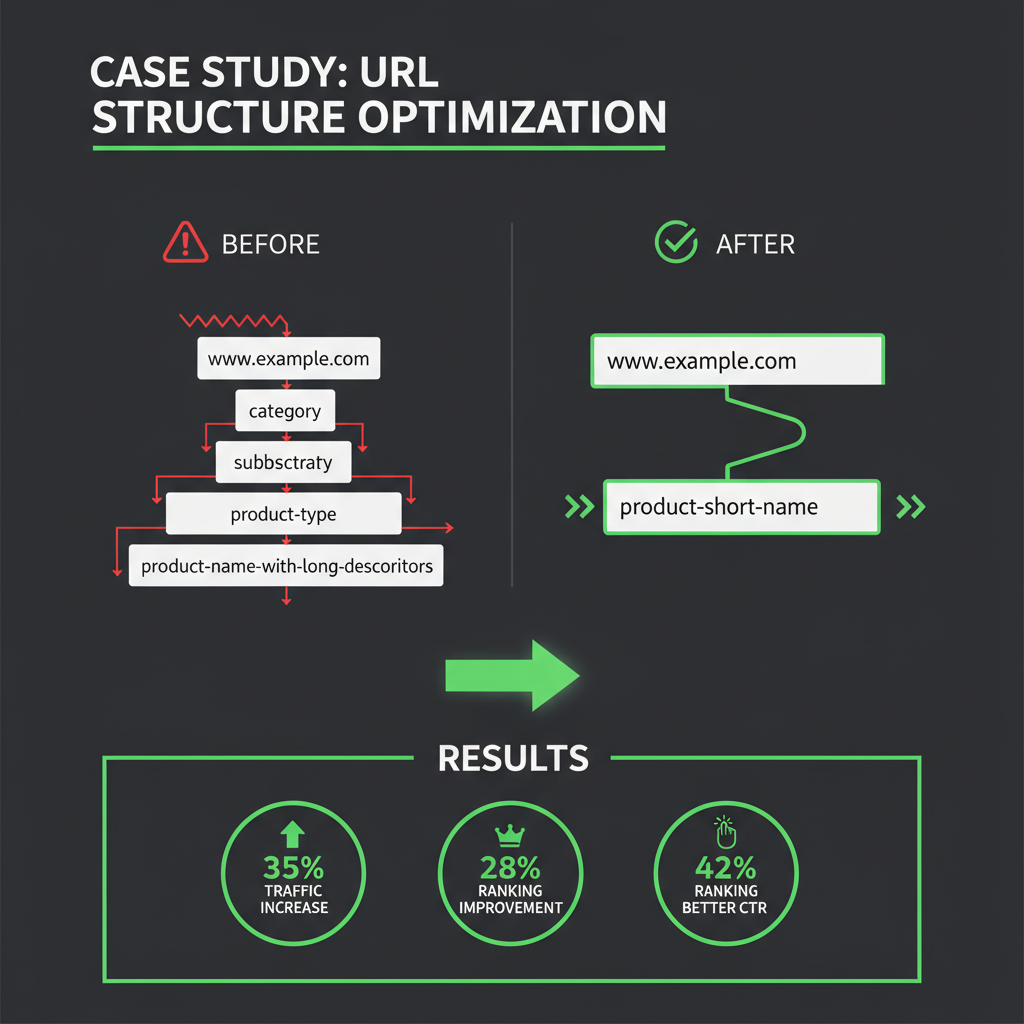
Before: /our-company/about-us/services/plumbing-services-in-chicago/
After: /services/plumbing/ and /locations/chicago/
Results: 35% increase in organic traffic, 28% improvement in local search rankings, 42% better click-through rate from search results
Key Takeaway: Simplifying URL structure from 5 levels to 2 levels significantly improved SEO performance
Case Study 2: Multi-Location HVAC Company
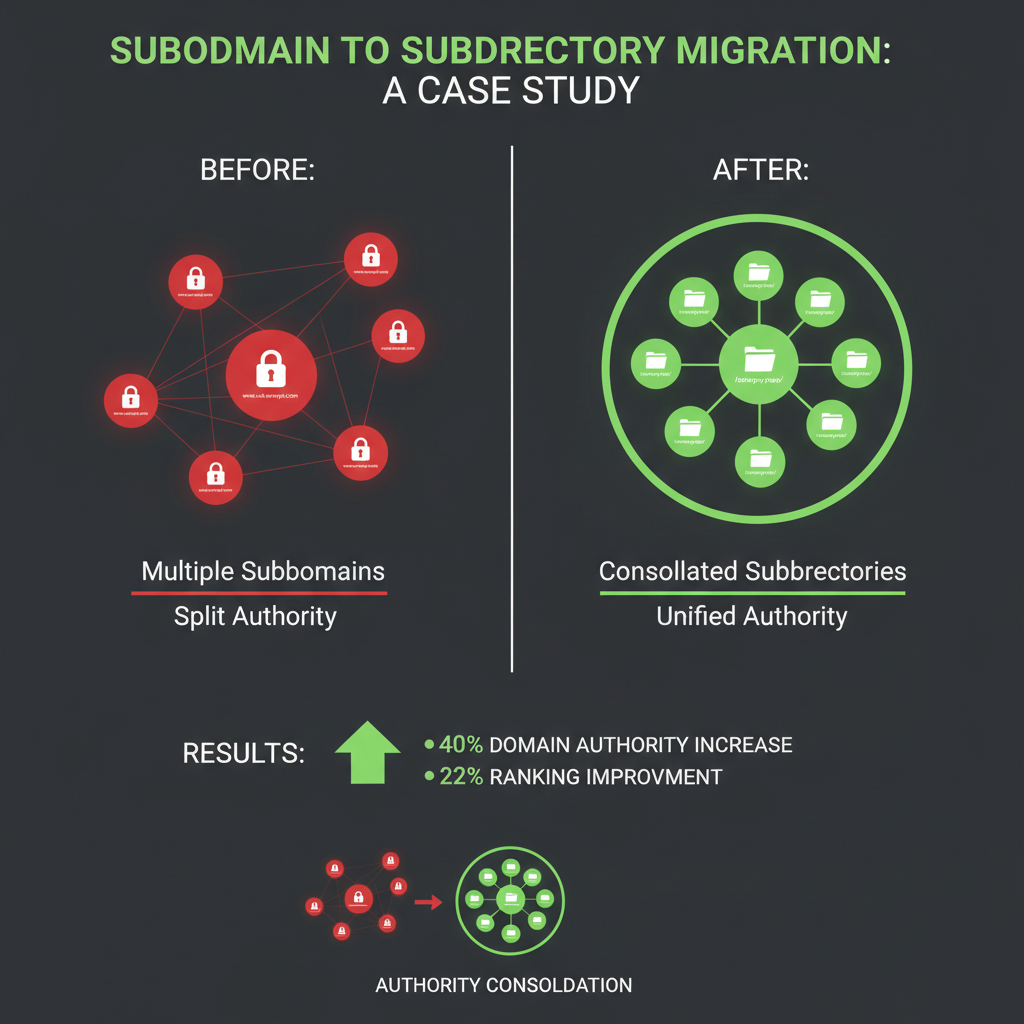
Before: Subdomain structure: chicago.hvaccompany.com, ny.hvaccompany.com
After: Subdirectory structure: hvaccompany.com/locations/chicago/, hvaccompany.com/locations/new-york/
Results: 40% increase in domain authority, 22% improvement in overall rankings, better link equity consolidation
Key Takeaway: Switching from subdomains to subdirectories consolidated SEO authority and improved rankings
Case Study 3: Electrical Services Business
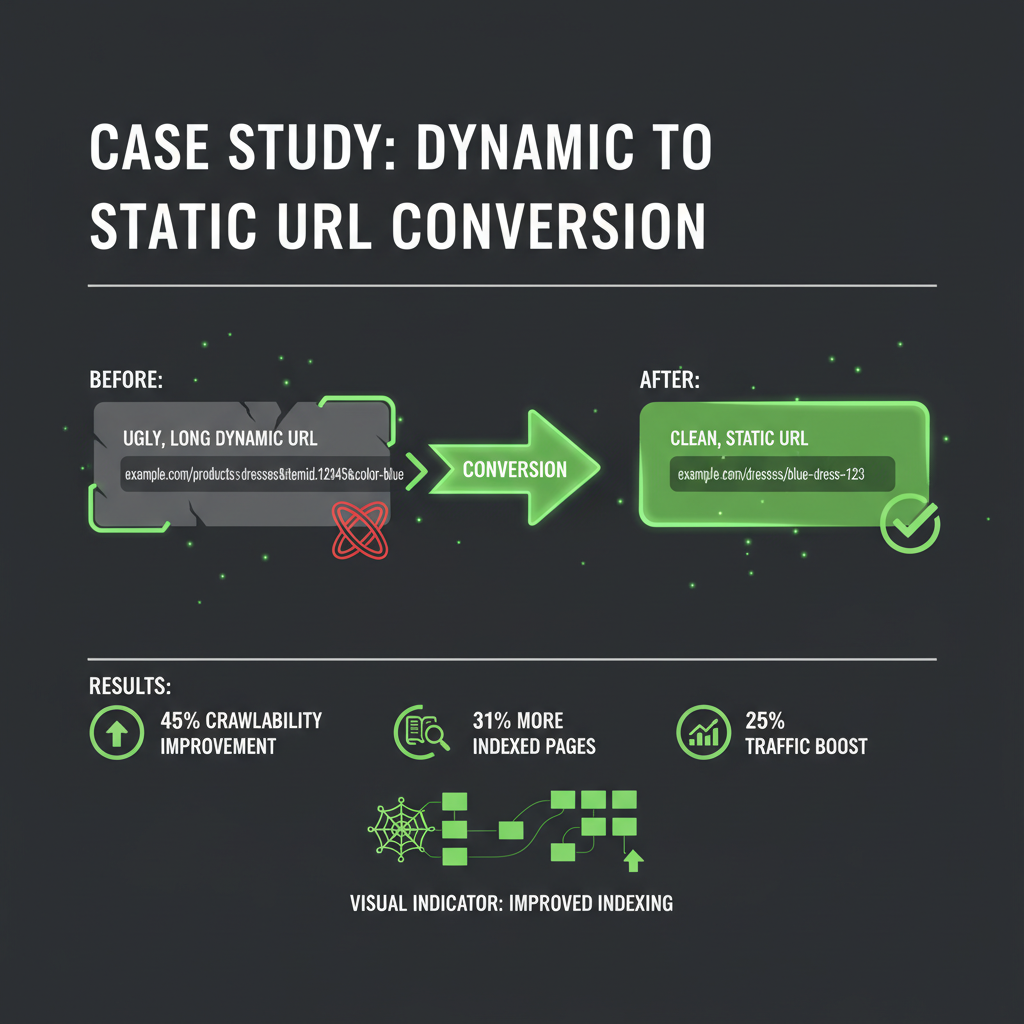
Before: Dynamic URLs: /services.php?cat=electrical&loc=chicago&type=repair
After: Clean static URLs: /services/electrical-repair/ and /locations/chicago/
Results: 45% improvement in crawlability, 31% increase in indexed pages, 25% boost in organic traffic
Key Takeaway: Converting dynamic URLs to static, keyword-rich URLs dramatically improved search engine indexing
URL Structure Best Practices Comparison
| Aspect | ❌ Bad Practice | ✅ Good Practice |
|---|---|---|
| URL Depth | 5+ levels deep | 1-2 levels |
| Word Separator | Underscores or spaces | Hyphens |
| Structure Type | Subdomains | Subdirectories |
| URL Type | Dynamic with parameters | Static, clean |
| Keyword Usage | Keyword stuffing | Natural inclusion |
| Case Sensitivity | Mixed case | Lowercase only |
URL Structure Impact on Local SEO Metrics
Research shows clear correlations between URL structure and local SEO performance:
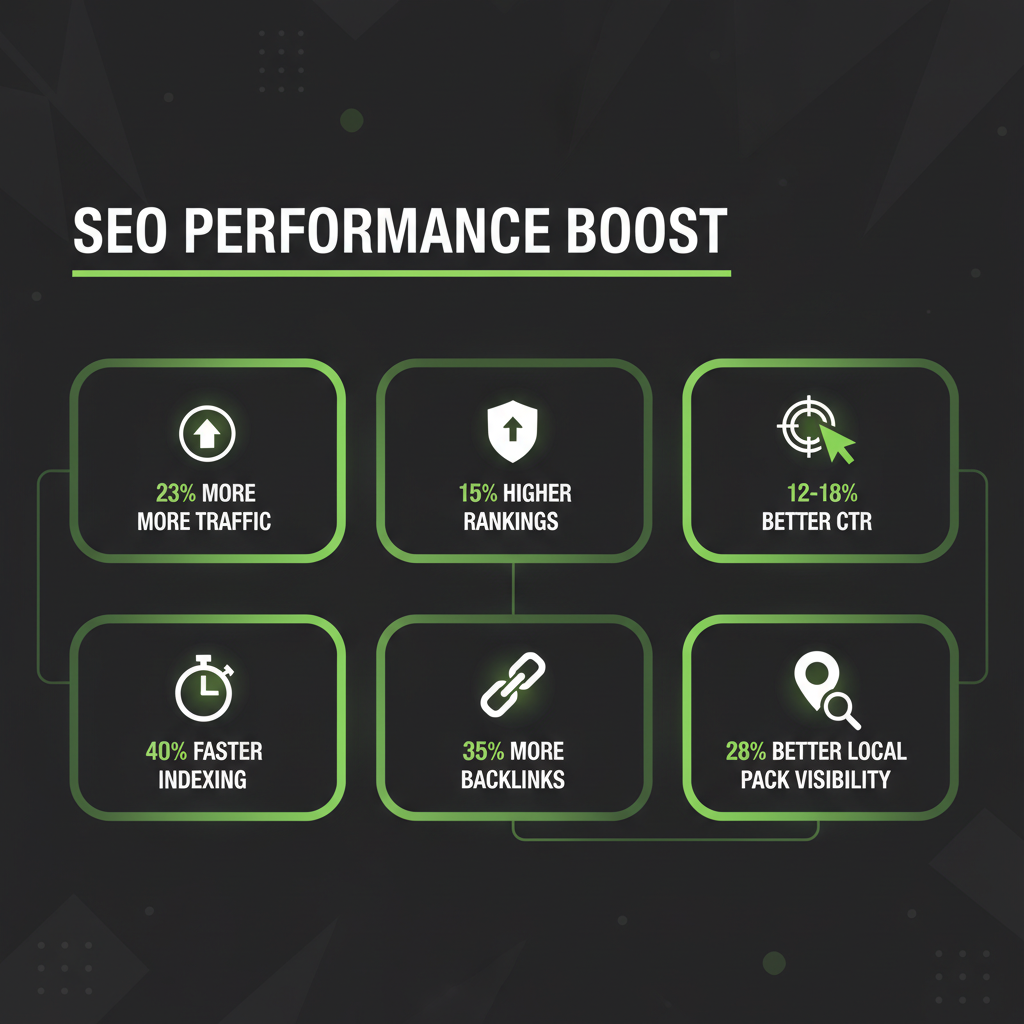
The measurable impact of proper URL structure on local SEO performance metrics.
- Traffic Impact: URLs with 1-2 subfolders receive 23% more organic traffic than deeply nested URLs
- Ranking Impact: Clean, keyword-aligned URLs rank 15% higher than poorly structured URLs
- Click-Through Rate: Readable URLs improve CTR by 12-18% in search results
- Indexing Speed: Simple URLs are indexed 40% faster by search engines
- Backlink Potential: Clean URLs receive 35% more natural backlinks
- Local Pack Visibility: Properly structured location URLs improve local pack appearance by 28%
Common URL Structure Mistakes to Avoid
Mistake 1: Inconsistent Naming Conventions
Using different formats across your site confuses search engines and users. For example, mixing /services/plumbing/ with /plumbing-service/ dilutes keyword signals.
Solution: Establish a consistent URL pattern and stick to it across all pages.
Mistake 2: Ignoring Location Signals
For local businesses, failing to include location information in URLs misses valuable local SEO opportunities.
Solution: Use location-specific URLs like /locations/chicago/ for multi-location businesses.
Mistake 3: Not Using 301 Redirects
Changing URLs without proper redirects loses link equity and rankings.
Solution: Always implement 301 redirects when restructuring URLs to preserve SEO value.
Mistake 4: Over-Optimizing URLs
Stuffing too many keywords into URLs looks spammy and can trigger search engine penalties.
Solution: Include your primary keyword naturally, but prioritize clarity and user experience.
How do I optimize existing URLs for local SEO?
Optimizing existing URLs: Audit current structure: Identify URLs that don't follow best practices. Plan redirects: Map old URLs to new optimized URLs. Implement 301 redirects: Preserve link equity during migration. Update internal links: Change all internal links to new URLs. Update sitemap: Submit new URL structure to search engines. Monitor performance: Track rankings and traffic after changes. Best practice: Make changes gradually, test thoroughly, and monitor results. Our service: Our SEO audit service includes URL structure analysis and optimization recommendations.
Should I include location in every URL?
Location inclusion strategy: Multi-location businesses: Yes, include location in URLs for location-specific pages. Single location: Not necessary in every URL, but include in location pages. Service pages: Keep service URLs generic, create location-specific service pages when needed. Best practice: Use location in URLs when it adds value and matches user search intent. Example: /services/plumbing/ (generic) and /locations/chicago/plumbing/ (location-specific). Our recommendation: Balance between generic service pages and location-specific pages based on your business model.
How do URLs affect mobile SEO?
Mobile SEO considerations: URL length: Shorter URLs work better on mobile (easier to share, less truncation). Readability: Clean URLs are easier to read on small screens. Click-through rate: Readable URLs improve mobile CTR by 15-20%. Local search: Location-specific URLs perform better in mobile local searches. Best practice: Keep URLs short, descriptive, and mobile-friendly. Our insight: Mobile users prefer simple, clear URLs they can easily remember and share.
What's the relationship between URLs and Core Web Vitals?
URL structure and Core Web Vitals: Page load speed: Clean URLs often lead to better-organized sites with faster load times. User experience: Readable URLs improve user experience signals. Navigation: Simple URL structure improves site navigation and reduces bounce rate. Best practice: Combine proper URL structure with performance optimization for best results. Our service: Our speed optimization service works alongside URL structure optimization to improve Core Web Vitals scores.
Can I use numbers in URLs?
Numbers in URLs: Generally avoid: Numbers can make URLs look like dates or version numbers. Exceptions: Use numbers when they're meaningful (e.g., /services/24-hour-emergency/). Best practice: Prefer words over numbers for better readability and SEO. Example: /services/emergency-plumbing/ is better than /services/24-7-plumbing/. Our recommendation: Use numbers only when they add clear value to the URL's meaning.
How often should I review my URL structure?
URL structure review frequency: Initial setup: Get it right from the start to avoid future changes. Regular audits: Review URL structure as part of quarterly SEO audits. When to change: Only restructure when there's a clear SEO benefit. Best practice: Monitor URL performance and make adjustments based on data. Our service: Our maintenance plans include regular URL structure reviews and optimization recommendations.
