

Apple WebKit Zero-Day: iOS WebKit Exploit Allows iPhone Compromise by Loading a Webpage
Your iPhone can be compromised by loading a webpage. No click. No download. Just visit the wrong site. Apple patched this a month ago. Only 16% of users have updated. StatCounter data from January 2026 shows iOS 26 (all versions) on just 16% of iPhones, while iOS 18 (unpatched) remains on over 60% of devices. This is the lowest adoption rate Apple has seen in years.
December 12, 2025 — Apple has released emergency security patches for two critical Apple WebKit zero-day vulnerabilities that were already being exploited in targeted attacks against iOS, iPadOS, and macOS devices. The vulnerabilities, identified as CVE-2025-43529 and CVE-2025-14174, allow attackers to execute arbitrary code execution on affected devices simply by loading maliciously crafted web content. Google's Threat Analysis Group discovered these WebKit exploits in the wild, confirming that sophisticated attackers were using these vulnerabilities in targeted attacks against specific individuals.
These two WebKit zero-day vulnerabilities represent a critical security flaw in the Apple WebKit browser engine that powers Safari and all web browsers on iOS, iPadOS, and macOS. The exploitation of these vulnerabilities allows attackers to bypass iOS security measures and gain complete control of affected devices. Both vulnerabilities were exploited in targeted attacks before Apple could release patches, making them true zero-day exploits.
What is an Apple WebKit Zero-Day Vulnerability?
An Apple WebKit zero-day vulnerability is a security flaw in the WebKit browser engine that powers Safari and all browsers on iOS, iPadOS, and macOS. The term "zero-day" means attackers discovered and exploited the vulnerability before Apple could patch it. WebKit processes all web content on iOS devices, making it a critical attack surface. When exploited, these vulnerabilities can allow attackers to execute arbitrary code execution on your device simply by visiting a maliciously crafted web content—no user interaction required beyond loading the page.
The Attack: No Click, No Download, Just Visit the Wrong Site
The two Apple WebKit zero-day vulnerabilities represent a critical security flaw in the browser engine that powers Safari and all web browsers on iOS, iPadOS, and macOS. These vulnerabilities were exploited in targeted attacks against specific individuals, demonstrating the sophistication of modern cybersecurity threats. The exploitation of these WebKit vulnerabilities allows attackers to bypass iOS security measures and gain complete control of affected devices.
The two Apple WebKit zero-day vulnerabilities work together to create a complete exploit chain:
- CVE-2025-43529: A use-after-free vulnerability in Apple WebKit's rendering engine that allows remote code execution through maliciously crafted web content. This WebKit vulnerability enables attackers to execute arbitrary code in the browser context.
- CVE-2025-14174: A memory corruption vulnerability in the ANGLE (Almost Native Graphics Layer Engine) graphics library that enables sandbox escape. ANGLE is shared between Chrome and Safari, making this vulnerability critical for both browsers.
These two WebKit vulnerabilities work together to create a complete exploit chain. The first vulnerability (CVE-2025-43529) allows code execution in the browser, while the second vulnerability (CVE-2025-14174) enables sandbox escape. Together, they represent a critical security flaw that requires immediate patching. The exploitation of these WebKit zero-days demonstrates the sophistication of modern targeted attacks.
Apple called the attacks "extremely sophisticated" targeting "specific individuals." That means commercial spyware. The kind used against journalists, activists, and political figures. These targeted attacks demonstrate how WebKit vulnerabilities are being weaponized by commercial spyware vendors to compromise high-value targets. The exploitation of WebKit zero-days has become a standard tactic in sophisticated surveillance operations.
⚠️ Critical Warning: This is a drive-by exploit. Users don't need to download anything, click anything, or interact with the page in any way. Simply visiting a malicious website is enough to trigger the vulnerability. This makes it extremely dangerous for enterprise environments where employees browse the web as part of their daily work.
How the Zero-Day Attack Works
Here's how the exploit works: You visit a webpage. No click required. The page triggers the use-after-free bug in Apple WebKit. Every browser on iOS uses WebKit under the hood, so Safari, Chrome, Firefox, any browser, they are all affected. This WebKit exploit demonstrates how a single vulnerability in the browser engine can compromise the entire device.
Understanding Apple WebKit on iOS, iPadOS, and macOS
Apple WebKit is the browser engine that powers Safari and all browsers on iOS, iPadOS, and macOS. Apple requires all browsers to use WebKit, which means every browser on your iPhone, iPad, or Mac—Safari, Chrome, Firefox, Edge—uses the same underlying engine. This creates a single point of failure: if Apple WebKit has a vulnerability, all browsers are affected across iOS, iPadOS, and macOS devices.
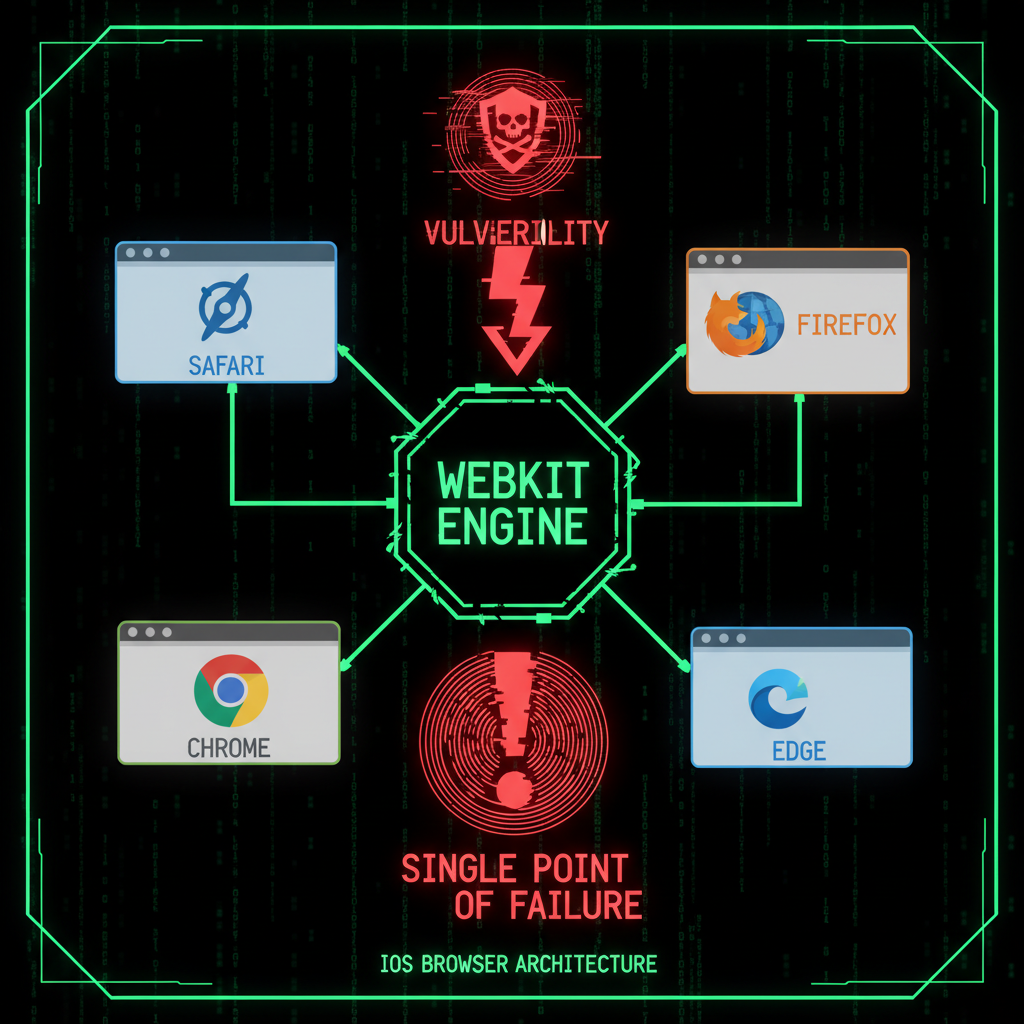
CVE-2025-43529: Use-After-Free Vulnerability in Apple WebKit
CVE-2025-43529 is a use-after-free vulnerability in Apple WebKit's rendering engine that allows remote code execution. A use-after-free bug occurs when code accesses memory after it has been freed, leading to memory corruption. This WebKit vulnerability allows attackers to execute arbitrary code execution by crafting maliciously crafted web content that triggers the bug when loaded. The exploit works by manipulating WebKit's memory management to execute code in the browser context, which can then be chained with additional exploits to escape the sandbox and gain full device access.
CVE-2025-14174: Memory Corruption Vulnerability in ANGLE
CVE-2025-14174 is a memory corruption vulnerability in the ANGLE (Almost Native Graphics Layer Engine) graphics library that enables sandbox escape. ANGLE is shared between Chrome and Safari, which is why Google patched it in Chrome on December 10, 2025, and Apple patched it in Safari on December 12, 2025. The two-day window between patches gave attackers time to reverse-engineer Google's fix and build exploits for iOS, iPadOS, and macOS devices. This memory corruption vulnerability requires an immediate fix to prevent exploitation. When combined with CVE-2025-43529, these two WebKit vulnerabilities create a complete exploit chain that allows attackers to compromise devices through malicious web content.
How Attackers Escape the Sandbox
Code executes inside the browser sandbox. The second vulnerability corrupts memory in a way that lets the attacker escape. A kernel exploit grants root access. At that point, the attacker owns your device. Messages, photos, microphone, camera, location. Everything.
The attack chain works like this:
- Initial Access: Victim visits malicious webpage (no click required)
- WebKit Exploit: CVE-2025-43529 triggers use-after-free bug
- Code Execution: Attacker executes code inside browser sandbox
- Sandbox Escape: CVE-2025-14174 enables memory corruption to escape sandbox
- Kernel Exploit: Additional exploit grants root access
- Full Compromise: Attacker has complete control of device
Why iPhone Security Matters: The WebKit Attack Surface
Apple WebKit zero-days are the standard entry point for sophisticated surveillance tools. NSO Group's Pegasus, Paragon Solutions, Intellexa, they all use this attack pattern. The exploitation of WebKit vulnerabilities has become a common tactic in targeted attacks against high-value individuals. The WebKit browser engine represents a critical attack surface because it processes all web content on iOS, iPadOS, and macOS devices, making any vulnerability in WebKit a potential entry point for attackers.
What is the Impact of WebKit Flaws Found in the Wild?
The impact of WebKit flaws found in the wild is severe. When WebKit vulnerabilities are exploited in targeted attacks, attackers can gain complete control of affected devices. This includes access to messages, photos, location data, microphone, camera, and all stored credentials. For businesses, the operational impact of WebKit vulnerabilities can be devastating: compromised devices can lead to stolen passwords, corporate email account takeover, access to business cloud storage, and intellectual property theft. The fact that these WebKit exploits are being used as initial access vectors by sophisticated threat actors makes them particularly dangerous.
Are WebKit Exploits Being Used as Initial Access Vectors?
Yes, WebKit exploits are being used as initial access vectors by sophisticated threat actors. Commercial spyware vendors like NSO Group, Paragon Solutions, and Intellexa use WebKit zero-days as the first step in their attack chains. The exploitation typically follows this pattern: WebKit exploit for code execution → sandbox escape → kernel exploit → persistent spyware installation. This makes WebKit vulnerabilities a critical initial access vector that threat actors actively seek and exploit.
What Kind of Threat Actors Are Exploiting WebKit Vulnerabilities?
The threat actors exploiting WebKit vulnerabilities are primarily commercial spyware vendors and nation-state actors. These include companies like NSO Group (Pegasus), Paragon Solutions, and Intellexa, who sell surveillance capabilities to governments and law enforcement agencies. However, once WebKit exploits become public or are leaked, they can also be used by criminal organizations. The sophistication of these attacks demonstrates that WebKit vulnerabilities are being weaponized by highly capable threat actors targeting high-value individuals including journalists, activists, lawyers, and political figures.
- Find a WebKit bug that triggers on page load
- Chain it with a sandbox escape
- Add a kernel exploit
- Install persistent spyware
Who Is Being Targeted?
The targets are typically journalists, activists, lawyers, anyone who challenges power. But the tools spread. What starts as nation-state capability eventually shows up in broader criminal operations.
Apple has patched nine zero-days exploited in the wild during 2025. Google patched eight in Chrome. Memory corruption in browser engines remains the most valuable attack surface for targeted surveillance. The cybersecurity landscape continues to evolve, with Apple WebKit vulnerabilities being a primary target for sophisticated attackers. These zero-days represent a growing threat that requires constant vigilance and immediate patching. The pattern of WebKit exploitation demonstrates that attackers are specifically targeting the browser engine as a reliable method for compromising iOS, iPadOS, and macOS devices in targeted attacks.
Commercial Spyware: NSO Group, Paragon, Intellexa
Commercial spyware companies like NSO Group (Pegasus), Paragon Solutions, and Intellexa specialize in finding and exploiting zero-day vulnerabilities. They sell these capabilities to governments and law enforcement agencies. The same vulnerabilities can be used by criminals once the exploits become public or are leaked.
The Real-World Impact
When your iPhone is compromised through a WebKit zero-day, attackers gain access to:
- All messages (SMS, iMessage, WhatsApp, Signal)
- Photos and videos
- Microphone and camera (live surveillance)
- Location data (GPS tracking)
- Passwords and authentication tokens
- Email and cloud storage access
- Banking and financial apps
For business owners, this means a compromised iPhone could lead to:
- Corporate email account takeover
- Access to business cloud storage and documents
- Banking and financial account compromise
- Customer data theft
- Intellectual property theft
If your iPhone is compromised, attackers can steal your saved passwords—including your website passwords, hosting credentials, and FTP access. That's why we educate our clients about device security: a compromised device can lead to a compromised website. Our security audit service can help identify if your website has been compromised through stolen credentials.
The iOS 26 Adoption Crisis
StatCounter data from January 2026 shows a concerning trend:
- iOS 26 (all versions): 16% of iPhones
- iOS 18 (unpatched): Over 60% of iPhones
For comparison, iOS 18 reached 63% adoption by January 2025. iOS 26 is at less than one quarter of that rate. The lowest adoption Apple has seen in years.
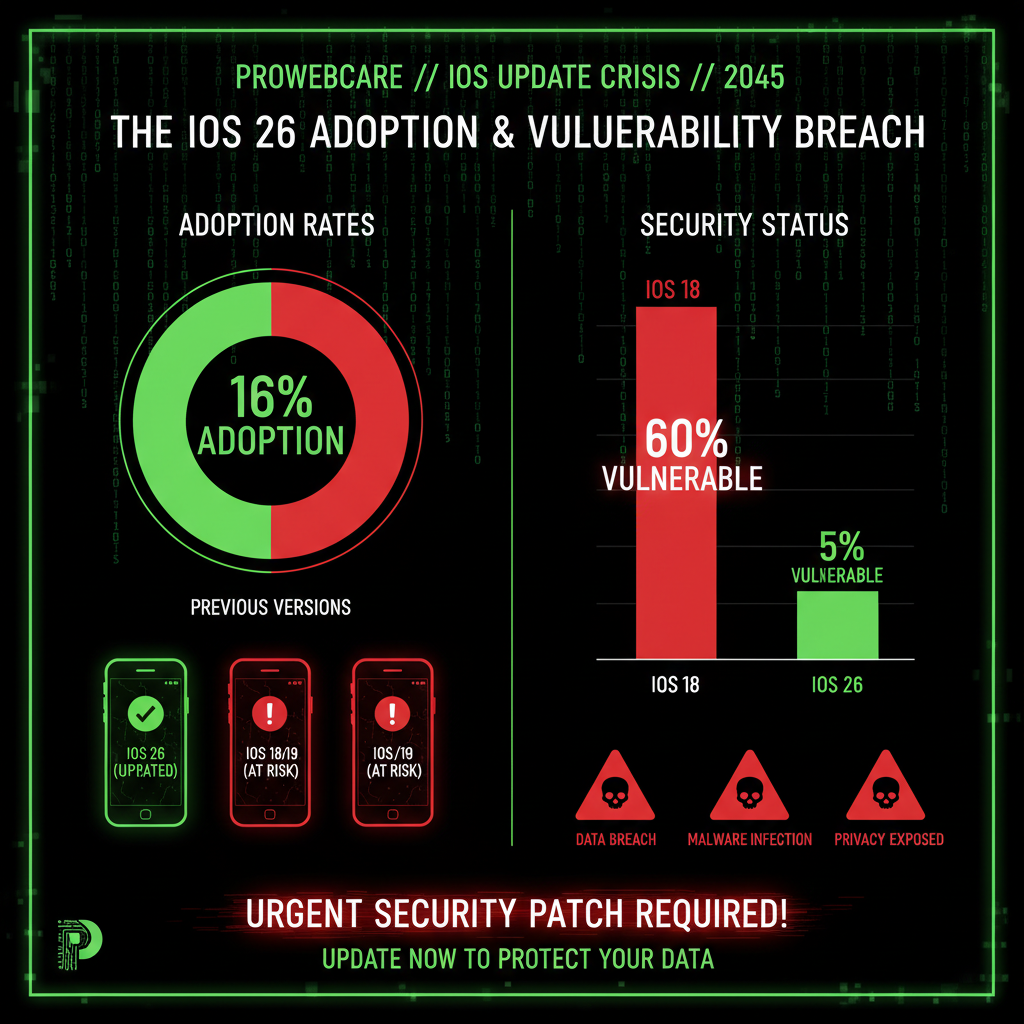
Only 16% of Users Have Updated
This means 84% of iPhone users are still vulnerable to these zero-day attacks. The majority of iPhone users are running unpatched versions of iOS 18, which cannot receive the security patches without upgrading to iOS 26.
Why iOS 26 Adoption is So Low
iOS 26 introduced Liquid Glass, a complete visual redesign. Translucent layers, blurred backgrounds, dynamic depth effects everywhere. Some users find it harder to read. Others report performance issues on older devices. Many just hate how it looks.
Comparison to Previous iOS Versions
Previous iOS versions saw much faster adoption rates. iOS 18 reached 63% adoption by January 2025, just a few months after release. iOS 26, released in September 2025, has only reached 16% adoption by January 2026—four months later. This represents a 75% reduction in adoption rate compared to iOS 18.
The Liquid Glass Redesign Problem
Apple made iOS 18.7.3, which patches the same bugs. But they only released it for older iPhones that cannot run iOS 26. The iPhone XS, XS Max, and XR.
Everyone with an iPhone 11 or newer has one option: iOS 26.2.
What is Liquid Glass?
Liquid Glass is iOS 26's complete visual redesign. It features:
- Translucent layers throughout the interface
- Blurred backgrounds with depth effects
- Dynamic visual effects that respond to device motion
- Redesigned icons and interface elements
- New typography and spacing
Why Users Hate Liquid Glass
Many users have reported issues with Liquid Glass:
- Readability problems: Translucent layers make text harder to read, especially in bright light
- Performance issues: Older devices (iPhone 11, 12, 13) experience lag and stuttering
- Visual fatigue: Constant motion and blur effects cause eye strain
- Battery drain: Additional visual effects consume more battery
- Accessibility concerns: Users with visual impairments find the new design harder to use
The Forced Upgrade Dilemma
Apple briefly allowed a workaround through the iOS 18 beta program. Then they closed that loophole too. So if you have an iPhone 11 or newer and want the security patches, you have to accept the Liquid Glass redesign whether you like it or not.
This creates a difficult choice for users:
- Stay on iOS 18 and remain vulnerable to zero-day attacks
- Upgrade to iOS 26 and deal with Liquid Glass design issues
There's no middle ground. Apple has forced users to choose between security and usability.
How to Protect Your iPhone
Here's what you need to do to protect your iPhone from these zero-day vulnerabilities:
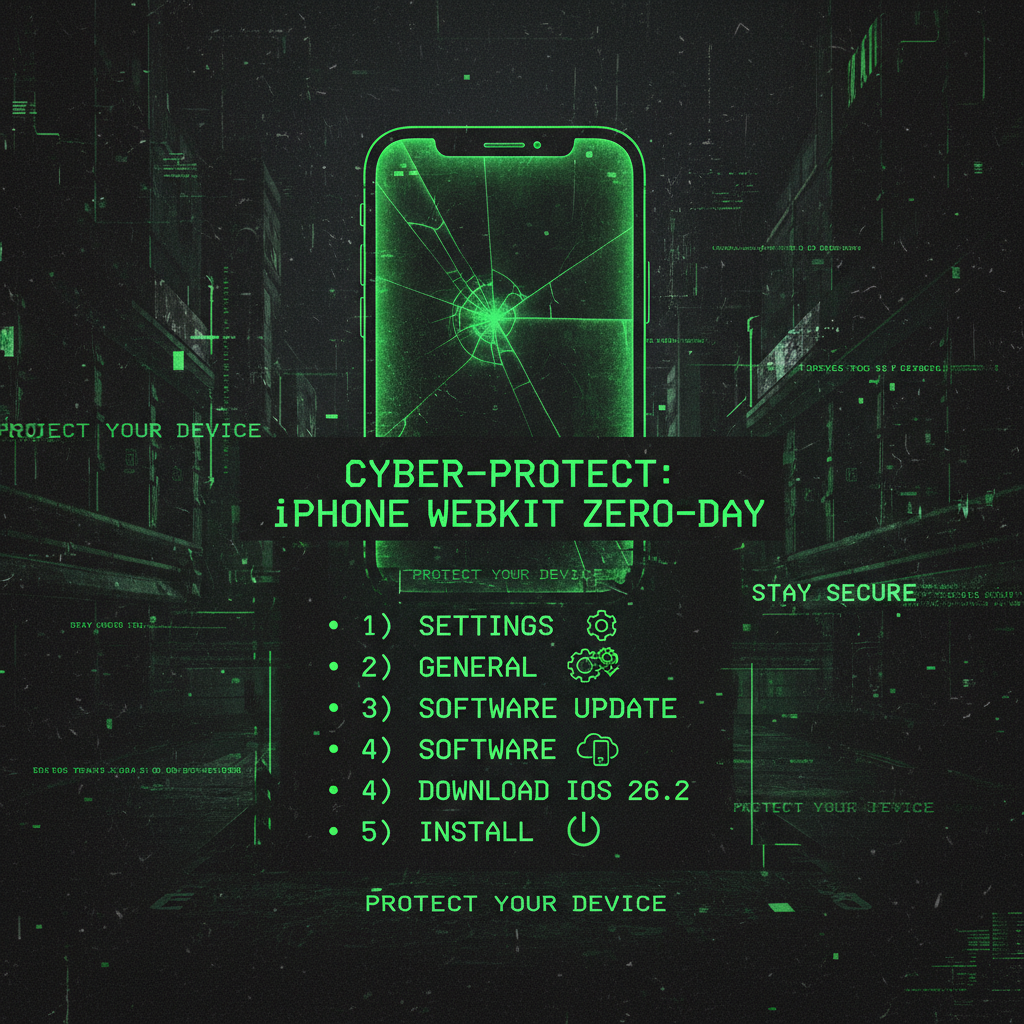
Update to iOS 26.2
If you have an iPhone 11 or newer:
- Open Settings
- Tap General
- Tap Software Update
- Download and install iOS 26.2
- Restart your device
iOS 26.2 includes patches for both CVE-2025-43529 and CVE-2025-14174. This patch fixes the vulnerabilities and prevents exploitation. This is the only way to protect iPhone 11 and newer devices. iPadOS 26.2 and macOS 15.2 also include these critical security patches.
iPhone XS, XS Max, XR: Install iOS 18.7.3
If you have an iPhone XS, XS Max, or XR:
- Open Settings
- Tap General
- Tap Software Update
- Download and install iOS 18.7.3
- Restart your device
iOS 18.7.3 includes the same security patches without requiring the Liquid Glass redesign. This patch fixes the WebKit vulnerabilities and prevents code execution exploits. These older devices cannot run iOS 26, so Apple provided a separate patch to fix the security flaw.
Enable Lockdown Mode
For high-risk individuals (journalists, activists, lawyers, political figures), enable Lockdown Mode:
- Open Settings
- Tap Privacy and Security
- Tap Lockdown Mode
- Turn on Lockdown Mode
Lockdown Mode provides additional protection against sophisticated attacks by:
- Disabling certain web technologies that could be exploited
- Blocking attachments in Messages
- Preventing certain features from working when device is locked
- Requiring device passcode for certain actions
Note: Lockdown Mode reduces device functionality. Only enable it if you're at high risk of targeted attacks.
Background Security Improvements (iOS 26.3 Beta)
Apple is testing a fix for future situations like this. iOS 26.3 beta includes "Background Security Improvements," a system that can push security patches for Safari and WebKit without requiring a full OS update. If it works, users could stay on their current iOS version and still get critical security fixes. But for now it is only in beta testing, so it does not help the 60% of users still running iOS 18 right now.
How Can I Detect and Respond to WebKit Zero-Day Exploits in My Environment?
Detecting and responding to WebKit zero-day exploits in your environment requires a multi-layered approach:
- Immediate Patching: Apply iOS 26.2, iPadOS 26.2, macOS 15.2, or iOS 18.7.3 patches immediately to prevent exploitation
- Network Monitoring: Monitor for unusual network traffic patterns that might indicate WebKit exploit attempts
- Device Monitoring: Watch for signs of compromise including unusual battery drain, data usage spikes, or unexpected app behavior
- User Education: Educate users about the risks of visiting untrusted websites, especially for high-risk individuals
- Lockdown Mode: Enable Lockdown Mode for high-risk individuals to reduce the attack surface
- Incident Response: Have an incident response plan ready in case of suspected WebKit exploit compromise
For enterprise environments, the operational impact of WebKit vulnerabilities requires immediate action. If you suspect a device has been compromised through a WebKit exploit, disconnect it from the network immediately and perform a security audit.
🚨 Critical Action Required: If you haven't updated your iPhone yet, stop reading this and update it now. Go to Settings → General → Software Update, install any available updates, and restart your device. This vulnerability is being actively exploited, and every moment you wait increases your risk.
Frequently Asked Questions
What is the Apple WebKit zero-day vulnerability?
The Apple WebKit zero-day vulnerability refers to two security flaws (CVE-2025-43529 and CVE-2025-14174) that allow attackers to compromise iPhones, iPads, and Macs by simply loading maliciously crafted web content. No user interaction is required beyond visiting the site. The vulnerabilities were discovered being actively exploited in targeted attacks in December 2025, and Apple released emergency patches on December 12, 2025.
How do I update my iPhone to iOS 26.2?
To update your iPhone to iOS 26.2:
- Open the Settings app
- Tap General
- Tap Software Update
- If iOS 26.2 is available, tap Download and Install
- Enter your passcode if prompted
- Wait for the update to download and install
- Your device will restart automatically
Note: iOS 26.2 is only available for iPhone 11 and newer. iPhone XS, XS Max, and XR should install iOS 18.7.3 instead.
Is my iPhone vulnerable to this attack?
Your iPhone is vulnerable if:
- You're running iOS 18.0 through iOS 18.7.2 (iPhone 11 and newer)
- You're running iOS 18.0 through iOS 18.7.2 (iPhone XS, XS Max, XR)
- You haven't updated to iOS 26.2 (iPhone 11 and newer) or iOS 18.7.3 (iPhone XS, XS Max, XR)
To check your iOS version:
- Open Settings
- Tap General
- Tap About
- Look for "Software Version"
If you see iOS 26.2 or iOS 18.7.3, you're protected. If you see any other version, you need to update immediately.
How do I protect my iPhone from this vulnerability?
The only way to protect your iPhone from this vulnerability is to update to the patched version:
- iPhone 11 and newer: Update to iOS 26.2
- iPhone XS, XS Max, XR: Update to iOS 18.7.3
Additionally, high-risk individuals should enable Lockdown Mode (Settings → Privacy and Security → Lockdown Mode). However, Lockdown Mode reduces device functionality, so only enable it if you're at high risk of targeted attacks.
If your business devices are compromised, attackers can steal your saved passwords—including your website passwords, hosting credentials, and database access. That's why we educate our clients about device security: a compromised device can leak saved passwords that lead to website compromise. Our security audit service can help identify if your website has been compromised through stolen credentials.
Do I have to use Liquid Glass to get security updates?
If you have an iPhone 11 or newer, yes. Apple only provides security patches for these devices through iOS 26.2, which includes the Liquid Glass redesign. There is no way to get security updates without accepting the new design.
If you have an iPhone XS, XS Max, or XR, you can install iOS 18.7.3, which includes the security patches without requiring Liquid Glass. These older devices cannot run iOS 26, so Apple provided a separate patch.
Apple briefly allowed a workaround through the iOS 18 beta program, but they closed that loophole. The only options are:
- Stay on iOS 18 and remain vulnerable
- Upgrade to iOS 26.2 and accept Liquid Glass (iPhone 11 and newer)
- Install iOS 18.7.3 (iPhone XS, XS Max, XR only)
Who is being targeted by these attacks?
These attacks are primarily targeting:
- Journalists and media professionals
- Human rights activists
- Lawyers and legal professionals
- Political figures and dissidents
- Anyone who challenges power or authority
However, the tools used in these attacks can spread to broader criminal operations. What starts as nation-state capability eventually shows up in criminal hands. This means even if you're not a high-profile target, you could still be at risk.
Commercial spyware companies like NSO Group (Pegasus), Paragon Solutions, and Intellexa sell these capabilities to governments and law enforcement. The same vulnerabilities can be used by criminals once exploits become public or are leaked.
What is CVE-2025-43529?
CVE-2025-43529 is a use-after-free vulnerability in Apple WebKit's rendering engine. A use-after-free bug occurs when code accesses memory after it has been freed, leading to memory corruption. This vulnerability allows attackers to execute arbitrary code execution by crafting maliciously crafted web content that triggers the bug when loaded. Apple patched this vulnerability in iOS 26.2, iPadOS 26.2, macOS 15.2, and iOS 18.7.3 on December 12, 2025.
What is CVE-2025-14174?
CVE-2025-14174 is a memory corruption vulnerability in the ANGLE (Almost Native Graphics Layer Engine) graphics library. ANGLE is shared between Chrome and Safari, which is why Google patched it in Chrome on December 10, 2025, and Apple patched it in Safari on December 12, 2025. The two-day window between patches gave attackers time to reverse-engineer Google's fix and build exploits for iOS, iPadOS, and macOS devices. Apple patched this vulnerability in iOS 26.2, iPadOS 26.2, macOS 15.2, and iOS 18.7.3 on December 12, 2025.
Conclusion
Your iPhone can be compromised by loading a webpage. No click. No download. Just visit the wrong site. Apple patched this a month ago, but only 16% of users have updated.
The Apple WebKit zero-day vulnerability represents one of the most dangerous types of mobile security threats: a drive-by exploit that requires no user interaction. Attackers can compromise your device simply by tricking you into visiting maliciously crafted web content. This cybersecurity threat affects iOS, iPadOS, and macOS devices, making it a critical concern for all Apple users.
For 84% of iPhone users still running unpatched iOS 18, the risk is real and immediate. These vulnerabilities are being actively exploited by commercial spyware companies targeting journalists, activists, and political figures. But the tools spread, and what starts as nation-state capability eventually shows up in criminal hands.
Update your iPhone now. If you have an iPhone 11 or newer, update to iOS 26.2. If you have an iPhone XS, XS Max, or XR, update to iOS 18.7.3. There's no excuse for remaining vulnerable when patches are available. Security is not negotiable.
If your business devices are compromised, attackers can steal your saved passwords—including your website passwords, hosting credentials, and database access. That's why we educate our clients about device security: a compromised device can leak saved passwords that lead to website compromise. Our security audit service can help identify if your website has been compromised through stolen credentials. We can also help with maintenance plans that include automated website security monitoring and protection.
Why We Write About Mobile Security (And Why It Matters for Your Business)
You might be wondering: "Why is a website maintenance company writing about iPhone vulnerabilities? This isn't directly about WordPress or Joomla."
But it is directly related. Here's why:
When we give you a heads-up about critical security issues like iOS WebKit zero-days, we're not just being helpful—we're protecting your website and saving all of us time. Here's the reality:
- Your saved passwords are valuable to hackers. If your iPhone gets compromised through a browser exploit, attackers can steal your saved passwords—including your website passwords, your hosting credentials, your FTP access, and your database passwords. That's why we educate our clients to be safe: a compromised device can leak saved passwords that lead to website compromise. Suddenly, your website is compromised not because of a WordPress vulnerability, but because your iPhone was exploited and leaked your passwords.
- An educated client is easier to serve. When you understand security threats, we speak the same language. You know why we recommend certain security measures. You understand why we push for updates. You see the bigger picture—that website security isn't just about plugins and themes, it's about the entire digital ecosystem you operate in.
- Prevention saves everyone time. If you get hacked because of a mobile vulnerability, we have to clean up the mess. That takes time—your time dealing with the breach, our time cleaning and securing your site. By giving you a heads-up about critical issues like this, we're preventing problems before they happen. It's proactive maintenance, not reactive cleanup.
- Your security is our peace of mind. We sleep better knowing our clients are protected. When you're secure, your website is secure. When your website is secure, we don't have to spend hours cleaning up malware, restoring backups, or dealing with blacklist removals. Everyone wins.
This is why we write about mobile vulnerabilities, operating system updates, email security, and other topics that might seem "unrelated" to website maintenance. They're not unrelated—they're part of the same security ecosystem. Your iPhone is a gateway to your website. Your email is a gateway to your hosting account. Your operating system is the foundation everything runs on.
We're not just maintaining your website. We're protecting your websites, identity, and everything. Security is not negotiable. And that starts with keeping you informed about threats that could compromise everything.
So when you see us writing about an iOS zero-day or a mobile security update, remember: we're protecting your website by protecting you. Because in the end, your security is our security. Your peace of mind is our peace of mind. Security is not negotiable. And an educated client who understands the threats? That's a client we can serve better, faster, and more effectively.
Last updated: January 12, 2026
CVE IDs: CVE-2025-43529, CVE-2025-14174
Status: Actively exploited in the wild
Patched Versions: iOS 26.2 (iPhone 11+), iOS 18.7.3 (iPhone XS/XS Max/XR)
Patch Date: December 12, 2025
Adoption Rate: 16% of iPhones running iOS 26 (as of January 2026)
